Archived forum. This is a read-only copy of the Smart Keyboard community forum (2010–2015), kept for its history and its skins. Posts are shown as they were written, so some answers are out of date — see Help for current information. Want a post of yours removed? Email contact@smartkeyboardpro.com.

HTC Styled Pop Up's in Compact Keyboard

boowalley
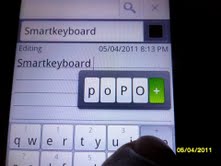
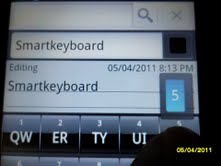
:oops: I know I said that I wasn't going to bug you anymore but this is just a feature request that I think will improve on the best mobile keyboard on both OS's. I prefer typing on with the Compact keyboard because the keys are bigger thus making my input faster and with less mistakes ( although your auto correct is awesome). Sometimes when using the compact keyboard I have to swipe to toggle the QWERTY keyboard in order to input special characters and uncommon words. It would be cool if I could stay on the compact keyboard and still have access to all the characters ala HTC Compact keyboard. Screen shots attached, I know someone reading this request might think "Why not just use the HTC keyboard instead of asking another developer to be more like HTC?" I don't want the SKP to be the HTC KB. I just think that Cyril with his talent can make a KB with all the best features that we find useful.

Attachments

Smarty1.jpg
Smarty1.jpg
Smarty2.jpg
Smarty2.jpg
richardkemp
I requested it once too, though it didn't get any love :-(


I second this. Please allow slide left and right after long-pressing to do something useful.
boowalley
I believe Cyril will get around to it just like he did with the arrows. He'll show us some love :D
cyril Developer
Technically this is super easy to do, the only problem is that for the "compact QWERTY international" layout, there would be so many alternative characters that they would not fit in a single row (and I don't even talk about T9 layout....)
boowalley
:| I feel ya. Would've been cool though. Handle yo bizness. It's funny how the more people get the more we want, huh ? :lol:
Ps: Could there be an easier way to minimize the keyboard ? I use the swipe down trigger to pull it down but it usually takes a couple of swipes to get it down without inputting a couple of random characters ?Ps,Ps: Duh, :oops: Hitting the back button minimizes the keyboard :oops:
cyril Developer
I added popup letters in the latest beta, but only for the basic English compact and T9 layouts at the moment. For the other ones I need to think about it.
richardkemp
Posted the following elsewhere before getting to this thread. Feel free to ignore my other post Cyril. Thought I should keep discussion of the popups here.
Thanks for that beta link Cyril, interesting stuff. I like the popups on long-press keys in T9, good stuff (they are new, right?!). Would it be possible to tweak them a bit? The way it is at the moment it requires two actions to access the 'default' long-press action (i.e. to get a number I have to long-press the key then tap the number), it would be good if on release of the long-press the 'default' were automatically assumed to be the one you wanted, the other options being accessible by sliding before releasing. This is how it was on the HTC IME when I used to use it, I think it works better that way.

Also a little bug: I am using the default google search app, I type in the box and then long-press a key to get the popup. I then slide my finger in the 'preview results' and the keyboard hides, but the popup stays, though is unclickable (i.e. just the image remains).

Do you maintain a list of features 'currently working on' or 'coming in next release', or even 'planned for future' ? And is there a dedicated place to find/discuss betas?
boowalley
:) Update : I put a weird name in my contacts and also inputted an funky password into one of my accounts today all while using the compact keyboard. To me this is definitely a useful feature that makes life a little easier.
aidanw
As usual there's always someone that doesn't like a feature - sorry I'm that guy this time

I find the popup characters annoying as they slow down my typing. When I used to be able to hold down and get hyphen immediately, now I have to hold, wait, then tap on the hyphen. This makes typing on the compact/t9 keyboards a lot slower for me - when these are supposed to be the light/fast keyboards.

Could you please add an option to disable this popup?
I've checked all the settings and everywhere it says "popup" or similar is disabled but I could've overlooked it if there's already a setting

Thank you :-)
boowalley
Bah Humbug ;) Just put the hyphen in the editable suggestion bar. I got all my punctuation's up there. I don't know any other keyboard that allows you to do that.
schrochem
I;m giving the compact keyboard a try.
I was interested in using the punctuation up in the suggestion bar.
How do you get it to pull up?
The only way I see is to hit space.
If I want a question mark at the end of a sentence I have to hit space to get it up on the bar.
Then there is a space between the word and the question mark.....

oh....I don't like the long press popup either....prefer just to see it insert the number.
boowalley
I personally don't like the "?" or the "!" right next to the word, maybe that's just the way I learned but I like to type fast and the go back and use the arrows to clean it up if I see any mistakes. And its been my experience that when inputting a number in the compact keyboard with the pop up's, the number is always the highlighted value so all you have to do is release your finger and the number will be chosen. The other letters are only there if you need them.
cyril Developer
aidanw wrote:As usual there's always someone that doesn't like a feature - sorry I'm that guy this time

I find the popup characters annoying as they slow down my typing. When I used to be able to hold down and get hyphen immediately, now I have to hold, wait, then tap on the hyphen. This makes typing on the compact/t9 keyboards a lot slower for me - when these are supposed to be the light/fast keyboards.
It's not normal, you should NOT need to tap to get the alternate letter!! Is the advanced option "slide popup keyboard" enabled as it should be?
However popups on "l" and "m" key is a bug I will fix it in the next version
boowalley
Just for informational purposes only. I just downloaded the Gingerbread update to my EVO 4G and the lag that I used to experience seems to be gone. It's running as smooth as a sewing machine. :D
cyril Developer
This feature will be back in 4.2.0, but now optional: "extended compact/T9" in language settings.