Archived forum. This is a read-only copy of the Smart Keyboard community forum (2010–2015), kept for its history and its skins. Posts are shown as they were written, so some answers are out of date — see Help for current information. Want a post of yours removed? Email contact@smartkeyboardpro.com.
Alt Symbol input disable to leave only Alt letters to input
hippywsk
Is it possible to make only Alt letters visible without Alt symbols by using long press.
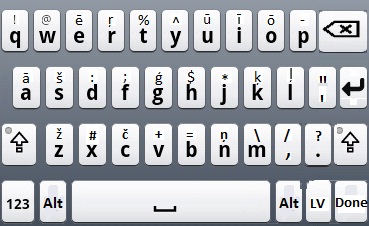
I'm using Latvian keyboard layout, and in Latvian we often use special characters such as ā, š, ģ or ķ. There are only one special character to most of the Latin letters, except letters without special characters in Latvian, such as d or f.
on a regular PC keyboard the apostrophe key ' is used before the Latin character with special alternative Latvian character. There is also a version with ~ (tilde) button to be pressed before the letter, or "Latvian qwerty" keyboard layout, where the any of two ALT keys and the necessary Latin letter is pressed together. These are 3 Latvian keyboard layouts commonly used in Latvia, so it will bet great to have those also in android phones.
In my eyes the perfect Latvian keyboard would look like the one in attached image file. (Each Long press alternative has only one alternative character as drawn)
Attachments
LV Keyb.jpg
hippywsk
I can help with more detailed information if it's needed.
cyrilDeveloper
Actually what you need is just to enable the "accents priority" option, to make accented letters the default choice when you do a long press. However this option doesn't work for Latvian at the moment, I will change this for next version.