Archived forum. This is a read-only copy of the Smart Keyboard community forum (2010–2015), kept for its history and its skins. Posts are shown as they were written, so some answers are out of date — see Help for current information. Want a post of yours removed? Email contact@smartkeyboardpro.com.

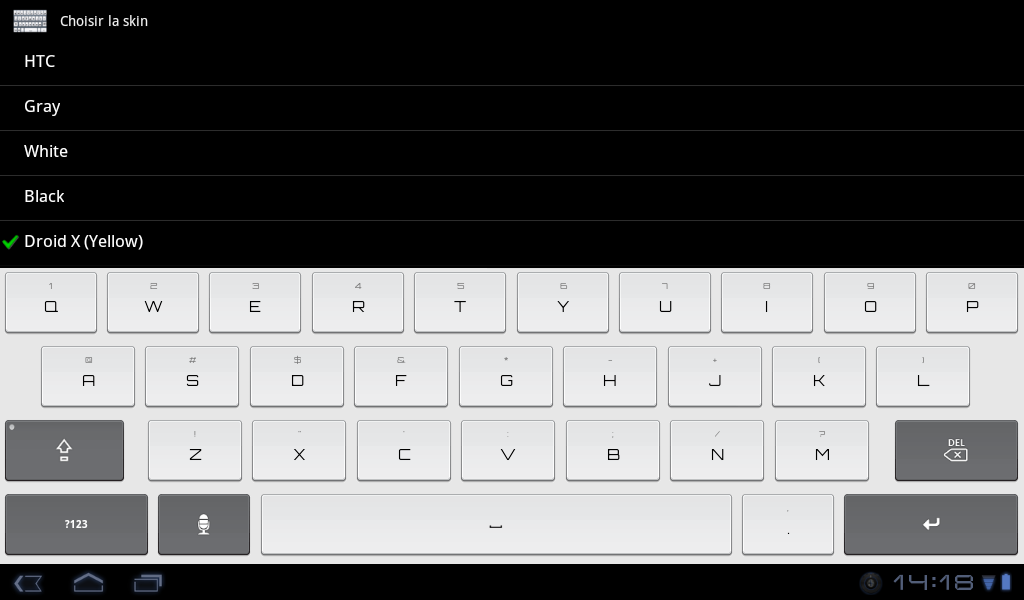
Droid X multiple colors and squared font (updated 07/31)

schrochem
Looks like something went wrong with the font after the last update from the market. I deleted the blue and downloaded again same weird font on my thunderbolt. I tried the green and it was the same. It was fine before. The Droid x you did in the other thread with red is still fine.
meyergre
You're right, I changed the font to try the new feature introduced in 4.3.1 beta.
If you prefer the default font, you can remove the following lines from the skin.xml :
<fonts>
<label>orbitron.ttf</label>
</fonts>
I can do it too, and let you choose between default and custom font, but these days I don't have enough free time...
I'll probably update this post on saturday.
meyergre
New colors available, and ALL of them available with black background too ;)
garcia8907
I have no idea on how to open the xml file to change the font back to the original one. Any help?
yhwhsupports
The above description will work just fine, but if your default text editor won't edit text, download SilverEdit Lite for free from the android market and you can copy the skin.xml from the text editor, and paste it in a new xml document in SilverEdit Lite (after you delete the 1st line info automatically put there by SilverEdit). You can also play with the color codes (for background, letters, words, etc) and skin name.
meyergre
Basically, i meaned doing this from a computer, but you're right, it can be done directly on the phone/tablet with the right tools

Sent from my Adam using Tapatalk
cubanjinx
I'm absolutlry in LOVE with these skins!! Thanks for your work!

If you're taking requests, :) I would love to see the grey inverted with some color pop ups. Maybe a deep red or grey/blue

Via TT
meyergre
cubanjinx wrote:I'm absolutlry in LOVE with these skins!! Thanks for your work!

If you're taking requests, :) I would love to see the grey inverted with some color pop ups. Maybe a deep red or grey/blue

Via TT
Not sure of what you're asking, if you want a colored pop-up window showing available letter(s), it's not skinnable yet.
If you mean the key press, I can do whatever you want ;)
cubanjinx
meyergre wrote:
cubanjinx wrote:I'm absolutlry in LOVE with these skins!! Thanks for your work!

If you're taking requests, :) I would love to see the grey inverted with some color pop ups. Maybe a deep red or grey/blue

Via TT
Not sure of what you're asking, if you want a colored pop-up window showing available letter(s), it's not skinnable yet.
If you mean the key press, I can do whatever you want ;)
Ya the keypress. Right now one the grey inverted when u tap a letter that pop up is white can you change that?

1 other suggestion: the prediction words are black which make them unreadable. I tried to change it in settings but only one word is colorized.

Via TT
meyergre
I can't do anything for the white popup, it's not possible yet.

You're right, i didn't notice the suggestions were still black, i'll correct it .

Sent from my Adam using Tapatalk
meyergre
I just re-uploaded the skins, tell me if it's better.
(It's hard not to forget one of them, since I've got 26 variants of this skin in my folder :? )
cubanjinx
Perfect! Thanks for being so fast with it! :)

Via TT
schrochem
Just wanted to come back and bump this to the top if new users haven't found it. Meyergre did a great job with these. I try new skins but this is the one I keep coming back to. Highly recommended.