I made this skin for the member "Omega," but I don't think he/she liked it...perhaps someone else will. It's a cross between the Droid X skin and the Cupertino. It's only available for hdpi screens (hi-rez).
Omega Skin
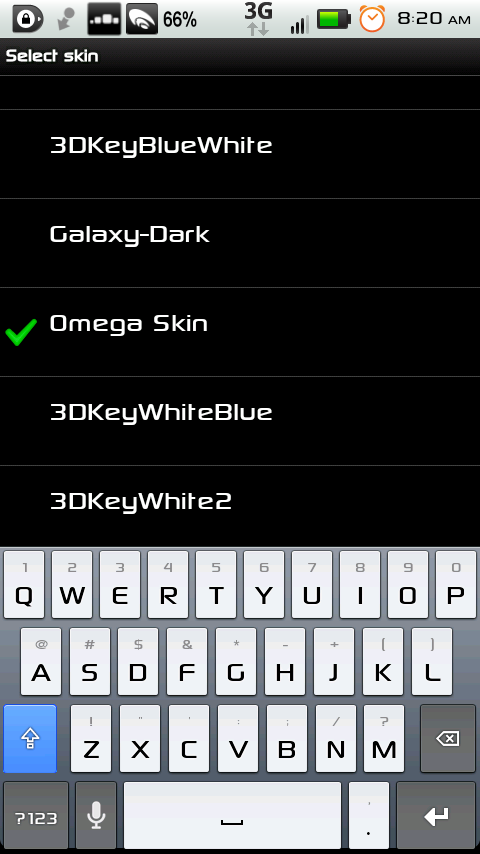
yhwhsupports wrote:I made this skin for the member "Omega," but I don't think he/she liked it...perhaps someone else will. It's a cross between the Droid X skin and the Cupertino. It's only available for hdpi screens (hi-rez).this is exactly what i was looking for (droid x keyboard with a greyish background), thanks!
just wondering, what would it take to get the default font on the keys?
It already has the default font on the keys. That's just my custom font on my phone, so yours won't look as cool as that pic. 
yhwhsupports wrote:It already has the default font on the keys. That's just my custom font on my phone, so yours won't look as cool as that pic.awesome, thanks! I'll try it after work tonight
This is just my own spam message to get this thread back on the 1st page. Hate me if you will. 
Hi i just looked thourgh the forum and found this awesome skin...can it be done for MDPI and with bigger buttons? (every droid skin has a very but very thick buttons on my phone...) Thnx
would you be feeling generous by any chance?  im curious if you could post another version but with the blue key press shown in the image instead of the red, thatd be awesome
im curious if you could post another version but with the blue key press shown in the image instead of the red, thatd be awesome@ 4tonMantis: I'm not sure what you mean by the red keypress, it is blue, just slightly darker than the active shift button. Perhaps you have a lower resolution screen. Unless I specifically label my skins as MDPI or LDPI, they are GENERALLY only for HDPI screens. I just figure if anyone is using this awesome keyboard app, they probably have an awesome phone too
i have an optimus v(currently using) and a samsung continuum, both of which the skin looks just as the screen shots but the key press is a bright candy redish color.
I don't know, it works just fine on my phone, but maybe it's just been a while and perhaps I fixed it after I uploaded it. Try this Dropbox link and let me know if it works:
http://db.tt/IV1Qtesn
http://db.tt/IV1Qtesn
Could you please let me know which custom font is that. Looks very nice
What about a MDPI/LDPI version ? This skin looks really gorgeous ! I need it on my Wildfire !
Font is Sony Sketch.
Sorry, no mdpi or ldpi.
Sorry, no mdpi or ldpi.