Archived forum. This is a read-only copy of the Smart Keyboard community forum (2010–2015), kept for its history and its skins. Posts are shown as they were written, so some answers are out of date — see Help for current information. Want a post of yours removed? Email contact@smartkeyboardpro.com.
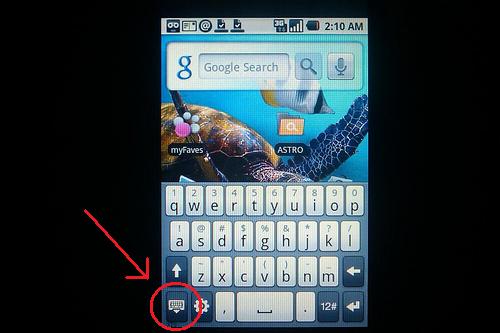
How about adding a close Key
Kds
Hello,
I prefer smart keyboard pro above my standard keyboard from HTC because I can select a dutch AZERTY keyboard but I miss the close key on my HTC keyboard layout.
Using the gestures to close the smart keyboard pro sucks on my HTC Desire and often does not work ... Thanks in advance !
Attachments
htckeyboard.jpg
cyrilDeveloper
Hi customizing the bottom row is not easy at the moment, but after a bit of redesign in the keyboard code (which I plan to do), this is something which will be possible
teomor
i also miss the close key on the default keyboard on my desire. i often type extra chars when i don't need them and it's especially dangerous since i'm always connected to the pc with a remote desktop app... i could easily delete files or stuff.. without even knowing. i am writing this on my pc, from my phone. when i'm done, i'll have to close the kb and make sure the gesture works the first time, unless the focus is in the textarea and typing extra chars won't be so bad
volatile
I put a feature request out for a close button as well. Thanks in advance
Ad Fundum
You can just tap the screen above the keyboard, and the keyboard will close
teomor
Ad Fundum wrote:You can just tap the screen above the keyboard, and the keyboard will close
that doesn't work in *every* app.
Ad Fundum
teomor wrote:
Ad Fundum wrote:You can just tap the screen above the keyboard, and the keyboard will close
that doesn't work in any app.
In an app, I just press the back-key when the keyboard is open and voila
teomor
damn! i did not know that.. you're a genius
Ad Fundum
Glad I could be of help
teomor
there's no need for the close key now, the request can be.. ignored as far as i'm concerned thanks, Ad Fundum.
chtamina
Ad Fundum wrote:In an app, I just press the back-key when the keyboard is open and voila
sometimes it will close the app or go back and sometimes it will close the keyboard
I don't know why.
Ad Fundum
chtamina wrote:
Ad Fundum wrote:In an app, I just press the back-key when the keyboard is open and voila
sometimes it will close the app or go back and sometimes it will close the keyboard
I don't know why.
You can press the keyboard once (on the backspace i.e.) to make sure that the keyboard is the last app that you selected. The back key only works on the app that you last selected, and if the app has an auto-open keyboard function, then you will have to press the keyboard once
webdizzy
Closing the keyboard while texting on my LG Vortex is a big issue. Gestures rarely work despite changing sensitivity and various swiping techniques. Tapping in the message area above the keyboard brings up the phone dialpad, and the backspace deletes the previous character or space. this is the only thing keeping me from buying Smart Keyboard.