Archived forum. This is a read-only copy of the Smart Keyboard community forum (2010–2015), kept for its history and its skins. Posts are shown as they were written, so some answers are out of date — see Help for current information. Want a post of yours removed? Email contact@smartkeyboardpro.com.

Asian Languages

acid.burn
Not sure if anyone put it on here, but could you put in Japanese?
It would make it the keyboard more loved by us Asian's if we could txt in our language too^^
cyril Developer
Hello
this one of the fun things (for me ;) ) which will take a lot of time to implement
But in the future, it could be added
seetowp
Can we also add in Chinese? Both traditional and simplified? Thanks!
cyril Developer
Chinese and Japanese are not yet in the plan, but Korean is on tracks
vztang
Hi Dev,

First off, I'm a great fan of smart keyboard.. :) and i'm very looking forward for a chinese language support in this keyboard.

Do you have the tentative date or maybe month for this? Thanks.. keep up the good work.
cyril Developer
Chinese is planed too, but I cannot give a date yet as there are many things in the plan ;)
dlzerocool
Hello,

SmartKeyboard is really good.http://www.youtube.com/watch?v=8csKTV1rc_0
That's nice to see that you are working hard on your application !

I found really nice to be able to already write Hiragana's (Japanese), but I do really need a dictionary with all the kana's and Kanji's.

Good luck with everything, thanks for your work.

small edit :
By the way here is what a japanese phone keyboard layout look like :
http://en.wikipedia.org/wiki/File:Keypa ... _708SC.jpg
and about how does that would fit in a smartphone, Iphone and Xperia 10 videos available on youtube.
iPhone:
http://www.youtube.com/watch?v=8csKTV1rc_0
xPeria10: both available on the market Simeji and OpenWnn
http://www.youtube.com/watch?v=50h5p3ZDbXY
IMHO simeji works much better.

I hope this will help in any way :)
And I hope Japanese will also be part of the plan :)
cyril Developer
Japanese is part of the plan, I have other priorities at the moment but I will work on it
cyril Developer
So finally the full implementation of Japanese (including kanji and katakana) is finished!
You can try this beta version, and you also need to install the japanese dictionary to have it working

Waiting for your feedbacks!
dlzerocool
Hi !
Awesome, thank you very much !!!
It's so cool to have Japanese support!

It works pretty good, even kanji suggestion is not always in a good order (but it doesn't matter right now you can look at it when you have time)

The more annoying thing is that katakana is only available for dictionary words.
Can you add an option (like pressing shift) to switch between Hiragana, Katakana and Latin letters.

It would be really perfect.
Thank you for everything, I'm already flooding my Facebook, twitter, LinkedIn etc... To use this keyboard !

Best regards,
yvan.
cyril Developer
Hello
suggesting katakana/latin for words which are not the dictionary should be easy, I will look at it for future versions.
I also need to work on next word prediction, but I think people can live without this ;)
dlzerocool
Exactly, it's pretty quick to swipe to the wanted kanji/word.
But katana is a bit more annoying (Latin already work but with Caps lock only)

----
Another suggestion would be a Japanese style input layout.
Using a kind of T9 keyboard layout would be perfect I think.
The thing is that you would have the keys like this :
[1 あ ] [2 か ] [3 さ ]
[4 た ] [5 な ] [6 は ]
[7 ま ] [8 や ] [9 ら ]
[‘' ° ] [ わ ] [、 。]

This is most common (basic cell phones) input method in japan,
then you have the choice or you hit quickly multiple times to switch between あいえう on the first key
or you swipe (if you have smartphones, that's how OpenWnn&Others work.)

As I said a Japanese Layout is the second stuff that would be really nice to see after the katakana/hiragana switch support.
Hope this will help you somehow lol.
Good luck with everything.

Other suggestion : I saw that you added a lot of special character from Japanese keyboard :P (that's really nice)
I'm just missing one is the _ underscore, who is close to twice the size of the latin one.
if you can add it to the 3 little dots key('d') it would be awesome.
----
A little bug (not important imho)
compact and compact/t9 don't work for Japanese input, maybe you should just disabled them for that language.
---
More little bugs :
I've the Smiley key always shown, since I edited the smiles they are a bit longer than the default ones and the problem is that they overlap on the other keys on the keyboard. (it's like the text of the smile is centered on the "smile key" and if you add a smile that is too large then it goes outside of the screen and on the keys on the left of the "smile key"
(don't know if I explained myself clearly, otherwise I can take a screenshot).
More infos : Only seen on portrait mode, in landscape the smiley key is larger so no overlay.
---
More bugs :
On landscape mode the key (123) is pressed (down) all the time.
it doesn't matter it's only a visual bug.


Thank you for everything,
The bugs I mentioned here are really not important, don't bother yourself too much with it if you have more important stuff to do.
The only real little thing that would retain a Japanese from using this keyboard would be the katakana feature missing and maybe the layout, IMHO.

Best regards,
Yvan.
cyril Developer
Well, I was going to investigate the katakana issue but I'm not able to reproduce it any more! (at least with version 3.5.1)
Can you give me a precise way to reproduce it?

About T9, it's in the TODO list already!
dlzerocool
I'm sorry I didn't understand about which issue you are talking ?
The katakana is just missing at moment, only available if it's a word coming from the dictionary like "カラオケ" (karaoke)
( ^_^)
cyril Developer
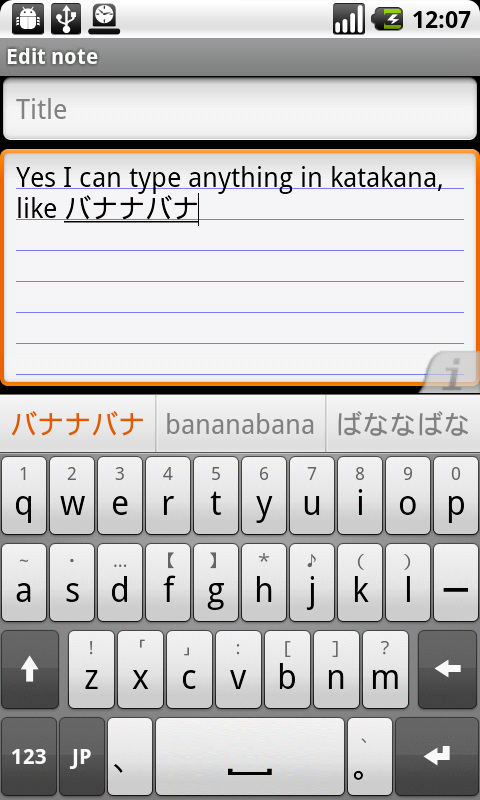
I mean, I can type anything even not in the dictionary, that's why I'm asking for a way to reproduce this problem

Attachments

device.png
device.png
dlzerocool
I just hit the search button then I tried to type " ibon " which is a name in Katakana and i'm unable to do it.
I'm able to write "ibo" イボ in katakana because it allows me to choose between hiragana and katakana
and then the n I can't even write it in hiragana nor katakana only latin letter is available.

Do you press any key to be able to write in katakana ?

ibon can be written like this : いぼん、イボン、偉凡
I'm unable to write any of thoose. Even in hiragana it will write : いぼn
I can't write the ん for n
dlzerocool
okay found a way to write いぼん
(just hit twice the n when writing "ibon")
But still not find a way to write it in Katakana.
cyril Developer
Ah ok I understand, you need to enable "always suggest" option (I will make something in the next version so that you don't need this option, as you always want suggestions when typing in japanese)
dlzerocool
Well I do have "always suggest" option checked, it must come from somewhere else.
dlzerocool
My mistake, it works, (but I still have to type twice the n)
dlzerocool
Sorry to post again :
There's still the bug that if you write いぼ ibo then the ん it will only want to write n in latin
bon kanji = 凡 is missing.

It also happens if you want to write n alone. it doesn't work, it will write only latin 'n'.

EDIT:

It's the same bug as before, you have to type "twice" if you want to see the ん or  ン

it's okay, not very intuitive but that's ok :) If you have more important bugs to work on.
Sorry for all the questions and asks.
Thanks again for this good keyboard.

yvan.
cyril Developer
Ah I found it, you also need the "smart dictionary" on! Not sure why, I will check...
cyril Developer
And about the "n", I changed the behavior on purpose, see this topic
And imagine you want to type "hi n o", it was impossible with the previous behavior (it would always convert to "hi no"). This is not a real example but you see the idea. And anyway all the japanese IMEs work like this so I have to do the same
dlzerocool
okay I understand :)
Thank you very much.
cyril Developer
Chinese (simplified) is now also ready for testing!

You need the beta version, and the Chinese dictionary.
cyril Developer
T9 mode for Japanese has been added in the latest beta
Can you give it a try?
dlzerocool
Hi !
Thank you, yes it's pretty good. it works like an old Japanese phone ^^ahah.
If you can make sliding available it will be awesome. (Since it's a smartphone) it's easier and natural.
Otherwise t9 also have a finding words stuff I forgot to mention, when you hit a ka sa for example
it will look for all words in dictionnary with a ka sa and will purpose the user the possibility to choose other words too.
the ones that can be written with " a,i,u,e,o" then " ka,ki,ku,ke,ko" "sa,shi,su,se,so" but it seems kinda difficult to realize, so it's more an information than a request lol.

A small thing that I can notice is that on the ?123 you will only switch to a "latin" special character, maybe since there's no space to put the others on these keys
you should add a page with these chars, but it's not "urgent".

Thank you for your work :)

EDIT :
maybe I don't explain myself very well so :
http://www.nuance.com/for-business/by-p ... /index.htm
under Japanese tab.

And an old news I didn't know about.
http://my.opera.com/wiz/blog/2009/06/16 ... on-android
They integrate the keys to switch between writing styles like real Japanese keyboards that's really cool.
dlzerocool
Just noticed that the initial poster of this thread is acid burn
I'm zerocool asking for same stuff that's funny...
(You need to see hackers the movie in order to understand this post.)
musashiken
Hi cyril, any word on the Katakana issue?

I still can't type katakana unless it's already in the dictionary.

I have enabled "always suggest" and "smart dictionary" as mentioned in previous posts but I still can't type individual katakana characters on their own.

Usually with other Japanese IME, you type a character in hiragana first and pressing space will prompt suggested words AND the katakana equivalent of that single character.


Still love your keyboard, it's the only one I use that has both Chinese and Japanese support.