Archived forum. This is a read-only copy of the Smart Keyboard community forum (2010–2015), kept for its history and its skins. Posts are shown as they were written, so some answers are out of date — see Help for current information. Want a post of yours removed? Email contact@smartkeyboardpro.com.
Bug Reports thread- post here instead of a new topic
^ basically, there are too many spam posts for me to handle, since I have to manually remove each of their posts. So just post in this thread with your bug reports instead of making a new one, which would probably otherwise be lost in the sea of spam.
This is temporary until cyril bumps me to admin, so I can manage spam better.
pumix
Hi
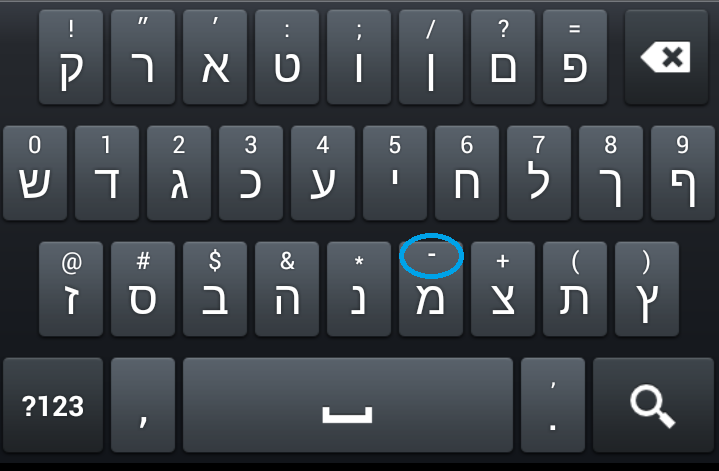
This is not really a bug, rather an oversight that's bugging me since the last update or the one before. In the Hebrew keyboard instead of a hyphen the symbol has accidentally been changed to a "higher" hyphen (sorry, don't know what its proper name is), and the regular hyphen has been bumped under "symbols". See attached photo.
It used to be the other way around, which I think is the way intended and that this is a simple mistake. I'd be grateful if there was a way to correct it.
Attachments
Screenshot_2012-09-07-13-26-22.png
dizaen
Hi guys, I've stumbled on an bug using russian layout: some letter + 'л' + 'э' It is impossible to type 'э' after 'л'. I got 'ж' instead of. Russian 3-lined layout.
coltswalker
Bug Description: Text Messaging Repeats Last Word
It seemed to be an issue where the last word of the previous message sent would sometimes automatically populate the text entry of the new message composition.
reproduce the issue.
# When ready to type a message, go into landscape orientation. # Type a word or more. # Press the back button or "Done' to leave the keyboard. (At this point it doesn't matter if you send or not). # Return to portrait orientation.
* Impacts some, but not all 3rd party onscreen keyboard apps including :* DEXILOG, LLC: Smart Keyboard Pro (4.6.3) :* Steven Lin: Keyboard from Android 2.3 (1.0.15.2) * Glitch not present when using the default system keyboard. * Some 3rd party onscreen keyboard apps that DO NOT exhibit the glitch behavior include :* Brightside Software: ThickButtons Keyboard (0.9.25)
It seems that this is a common glitch associated with some, but not all 3rd party onscreen keyboard apps. It is up to the developers of these apps to patch this glitch.
stbi
Hi,
I like Smart Keyboard and bought the Pro version therefore. I don't know what's the secret of this keyboard (maybe the calibration, or the multitouch), but I'm making much less typos and can type faster with it than with other keyboards of the same type (QWERTZ).
However I think I've discovered an annoying bug. My phone is not the fastest one, and so there are often lags while typing in some apps (e.g. TapaTalk). I'm used to this - it also happens with other keyboards. Usually I can simply go on typing, and the phone will print the typed letters later. But in Smart Keyboard, when I type a key while the phone lags, the keyboard will print the alternative char instead of the normal char, e.g. a "8" instead of a "i", or a "*" instead of a "g". It seems that the keyboard interprets the normal keypress as a long press when the key was pressed shortly before the lag began.
Is there a chance to get this fixed? I Have reduced the keypress time a bit so I don't have to press too long to get alternative chars like the German umlauts ä, ö, ü, ß. A workaround might be to extend this time to 500 ms or something, but this can't be the solution as this would obstruct my typing.
Thanks, Stefan
TheTehk17
^ I can reproduce the above two issues on my devices.
Marabu_Too
Hi, there's a rather annoying (for me) bug in the way the language button works: I have configured the two languages English (UK) and German. Every time I change to English and then back to German, the setting has changed to "German with Umlauts", making the keyboard much too cluttered for my fingers. Please make my selection stick!
Edit: I just remembered that you can select more than two languages - at least now I can access the right keyboard quickly
gtavo
Hi, I have a problem with my SK17i (Sony Ericsson Mini Pro), with the hardware keyboard, a lot of the hardware keys doesn´t match with the smart keyboard database, so it´s impossible to write anything...
With the xperia keyboard everithing is fine...
Tell me if you need anything, I bought the pro version (gtavo26)
OldDogEyes
On two apps, my Nexus 7 tablet running Android 4.1.2 is doing wonky things... before go into what is happening, I am running stock everything rom wise, have unlocked bootloader and am using SmartKeyboard Pro...
1. Listia auction app... when commenting on an auction, randomly (and very often) the cursor jumps to the beginning of the line while typing... makes it impossible to type a comment of even a few words...
NOTE: This DOES NOT happen with the stock Android keyboard ...
2. Zynga Poker... when chatting, backspace often deletes more than one character...
NOTE: This DOES STILL happen with the stock Android keyboard ... so it might be an issue with the app... Any thoughts?
puddleshark
I am fairly new to Smart KB but like it a lot and am considering buying the Pro version. I have come across a couple of problems, and one (1) really seems a serious bug (unless I'm missing something...).
(1) In numeric input mode, which comes up automatically when setting the time for an appointment or an alarm (both built in Samsung apps that come with the Galaxy S3), I cannot enter a two digit number (this was never a problem until I installed Smart KB). The first number I type into either the hour or minute field shows correctly, but it is underlined. When I press a second numeric key to enter, say, '10', nothing shows, i.e. I only see 1. As if it's trying to do predictive text for numbers?? I then tried to press Del to start again, at first Del does nothing, after a few presses, a not underlined number, usually the same number I had previous typed, shows, e.g. '33'. This second number comes up by pressing Del NOT another number key. VERY ODD!? It basically makes it impossible to enter times with the keypad, you have to use the scroll / arrow function, which can be long-winded. NB. The same numeric keypad works fine when entering a telephone number in the contacts, but the phone number is also underlined when it's being typed in, like in predictive text/for not good reason.
(2) When using predictive text with T9 keypad, but possibly also with qwerty, with the bar showing the different suggestions switched on, I noticed a lot of poor quality predictions, and many are capitalised quite randomly. For example 'Evening' will be a suggestion, but 'evening' isn't. I feel all predictions should be lower case unless I have pressed shift to indicate I want it capitalised. Some might argue proper names should be capitalised automatically, e.g. Wednesday. But surely not words like 'evening'. The ideal scenario would be a setting for this (either no auto-capitalisation or for proper names only). I have now switched the bar with suggestions off, and the T9 predictions seem better now and less often capitalised. Although I have not tested this properly.
(3) This may not be a problem but a case of me not knowing how to - not sure. When none of the predictions are right, how can I (quickly, easily) correct the word myself and have it added to the user dictionary? This is very easy ono Nokia phones.
Would be very pleased about a response as these problems are stopping me committing to Smart KB. As the S3 is a very popular phone, the numeric bug is quite a serious one I think?
Thanks! Dannie
espresso
After upgrading from Android 2.x to 4.0.4 on my LG Nitro HD I lost Multi-lingual voice input (speech to text). In Russian layout speech is recognized as English. In English layout - (no miracle) same English speech. Can you fix it please? Smart Keyboard Pro v. 4.6.3
WER4GZS
I am still not able to use the custom auto text as it does not work on my Samsung Galaxy Nexus either on ice cream sandwich or now jelly bean. I have tried changing the words and it still will not recognize anything. Is there an issue with it or something I am NOT seeing?
iskortch
After upgrading to the Jelly Bean update from AT&T OTA, the pop-ups on the keyboard dance/slide across the screen. I have tried clearing data, force closing and restarting as well as unintalling and re-installing without a fix. The stock Samsung keyboard on my S3 did the same thing, but after clearing data and force closing, it fixed the issue. Suggestions??
v6ak
Hello, I've found some bugs. There are two alt-related bugs and one enter-related bug (or possibly a feature I'd like to turn off). I have Sony Ericsson SK17i phone (with a hardware keyboard).
--- first bug ---
When I use alt+right (alt is the blue button at left bottom on SK17i's keyboard) or some other combinations with alt and then write a character, an alternative symbol is written instead. For example, "1" is written instead of "Q".
--- second bug ---
I've found also another alt-related bug. Steps to reproduce: 1. Press alt and hold it 2. Press K (it stands for "(") 3. Press L (it stands for ")") (You can also use other alt-symbols, this is just an example. It is enough to write one symbol only. But writing "()" and pressing left arrow is a common scenario for me.) 4. Release alt 5. Press a key that has different behavior when alt is pressed (e.g. left arrow or backspace). Expected result: the stanard behavior is used (e.g. go one character left or erase one character before cursor). Actual result: the alternative behavior is used (e.g. go to the beggining of line or erase whole line)
--- third bug ---
This may be a feature. If so, I'd like to turn this feature off When I long-press enter, backspace is fired. I use long-enter for opening links in new tab in Opera Mobile. With Smark Keyboard, it is interpreted as backspace, which goes back in the history.
Inuya5ha
Android 1.3.6 Device: Motorola Defy Mini XT 321 (Dual SIM) FLEX: LATAM_RTL_v19_0522_FLEXTNBST (retail) Root: NO
When editing text inside web pages (using the native phone's Internet browser) the Portrait Full Screen and Landscape Full Screen modes option are not applied: this means there is no fullscreen applied in this case and editing text in its current HTML layout can be a virtually impossible task sometimes.
To make it worse: Suggestion bar DOES NOT appear under this condition, the only way to see the suggestions bar is to disable Portrait Full Screen option. Please try to fix this issue soon, it's a real pain to edit fields without the keyboard in full screen mode. Thanks.
cowjl
Phone: Sony Xperia Z Android: 4.1.2
Hi,
I used Smart Keyboard Pro on my old phone for a long time and loved it; I never had any issues. I got a new phone yesterday (the Xperia Z) and have found that the keyboard simply does not respond when using some apps. For example, it does not work with Whatsapp, but always worked with this on my old phone (xperia x10 from 2009). It does work with text messages. Any ideas what might be causing this? I keep having to switch between the standard Android keyboard and the Smart Keyboard one.
Thanks, Wendy
halcyon
Bug #1 v. 4.6.3 - SmartKeyboard Pro Settings / Advanced Settings STRING "Disable Mutitouch" => "Disable Multitouch" (ie. add 'L').
Bug #2 v.4.63. - General Settings / Calibration feature ALWAYS shows QWERTY-layout and calibrates according to that EVEN if the use ONLY/ALWAYS uses a non-QWERTY layout, like for instance Swedish layout (which has extra alphabet keys on the topmost and middle rows, totally changing the typing points and the calculation for calibration). Due to this, the most errors I get are with the keys right close to the edges of the screen for those lines of letters (i.e. QWERT and ASDF lines on my layout I get most typing errors with letters Q,W, A, S, P, Å, Ö & Ä). This is regardless of doing calibration over and over again.
System 4.1.1 official Samsung firmware on Galaxy S 3 I9300.
Playsx
I bought nexus 4 and have big problem (for me) with your keyboard. Gestures is not work properly on Nexus 4. When I do swipe it works about 5 of the 10 times, even when sensitivity settings on max... Now your keyboard ( i think best on android) is unusable for me. Please, PLEASE fix this bug. Thank you
Nexus 4, stock 4.2.2 root
Karabusik
Device: Huawei Y300 Android: 4.1.1
I've got a pro (paid) version of Smart keyboard. I use this app as a default keyboard but after rebooting of my device the smartkeyboard pro becomes as non-default. So I have to re-check smartkeyboard pro as default upon each rebooting of device. In the same time the trial version of this app doesn't have similar problem.
xtrm
Hi, I have tested the keyboard for a while and its awesome, however I have found a big issue which makes me think two times before buying it.
With any process manager we can see the percentage of processor being used, and in this case if we check it with OS Monitor, Smart Keyboard is using more than 5% of CPU every second. It doesnt matter if we are using the keyboard or not, the CPU load of "net.cdeguet.smartkeyboard" is between 4% and 8% and never stops. Its a battery kill.
Please fix it so it doesnt uses CPU when we arent writting.
ChristianB
Bug in Norwegian language keyboard: In 9 button mode, when the T9 dictionary is off, it is impossible to write the special Norwegian letters Æ, Ø and Å (æ ø and å).
For instance, when I hit the abc button, it only switches between a, b and c. It should, however, switch between a, b, c, æ and å. This is the way it works on feature phones and the Samsung keyboard. The mno button only switch between m, n and o, while it should switch between m, n, o and ø.
dlk
Voice input not working on Nook HD+. When selected it goes to that mode but there's a red line through the Microphone. It is this feature I am particularly interested in - reason for switching keyboard. Does work on SwiftKey keyboard, but yours is rated better, so would like to get it working. Also when searching help files and forums, nothing found for 'voice input' or anything that contains that: message says "The following words in your search query were ignored because they are too common words: input voice." Yet this is a feature of your program and exact listing in settings.
blitx
Android 4.2.1 Device: Lenovo P780 (8GB) Root: Yes
Hi I found a bug on Thai language keyboard. Thai characters shift out from the keyboard button. Please help me to verify.
I am currently using Smart Keyboard Pro on my Samsung Galaxy S3. The problem I've found is, that when watching a movie or so, the arrows does not work correctly. If I push a single arrow nothing happends, but if I hold "mouse1" and push any arrow, it acts as an scroll. This was not an issue on my former phone, the Desire HD... It's really frustrating when you are watching a movie and you can't rewind or forward.
 When I long-press enter, backspace is fired. I use long-enter for opening links in new tab in Opera Mobile. With Smark Keyboard, it is interpreted as backspace, which goes back in the history.