Archived forum. This is a read-only copy of the Smart Keyboard community forum (2010–2015), kept for its history and its skins. Posts are shown as they were written, so some answers are out of date — see Help for current information. Want a post of yours removed? Email contact@smartkeyboardpro.com.
Dynamic resizing doesn't seem to work
dalingrin
I have not found the dynamic key touch zone resizing to work since the feature was added. When typing a word even if I am merely one "pixel" out side of what I presume to be the key hitbox, the keyboard will always register the wrong key. Perhaps I have misunderstood the feature's intended purpose.
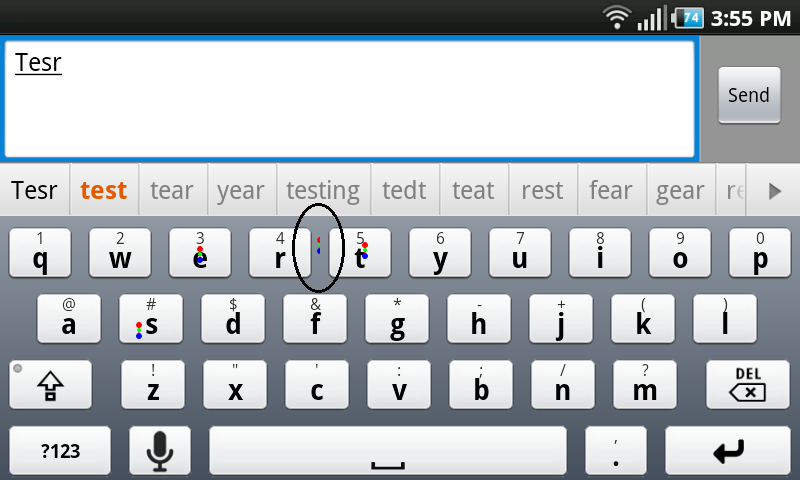
Attached is a picture that I believe illustrates what I am talking about. In the picture, I am typing the word "test" and I have tapped about 1 "pixel" outside of the "t" key. I would think if they keyboard is dynamically resizing the virtual key then it should have enlarged the "t" enough to correct that error.
You can see that the touch point is cut in half by at the center between the two keys so the point of contact was nearly perfectly between the two keys. I wonder if the touch point graphic being cut in half is because of the virtual key or the actually visual key graphic border. I'm guessing the latter.
Attachments
snap20100921_155547.png
cyrilDeveloper
Hello yes it works, but "tesr" is not a good example, as "r" is also a valid letter in that case (as you can see "year" or "tear" are also valid predictions, in case you mistyped other letters). A good example is "going". If you type a "h" instead of the last "g", you can clearly see that the virtual size of the g key is bigger
pomakis
Sorry, I don't understand. If this feature is all about predicting which letters are more likely to be next based on what has already been typed, then 't' is very obviously much more likely than 'r' in the above situation. I'm willing to bet that the number of people who intend on typing 't' after typing "tes" is at least 20 times more likely than those who intend on typing 'r'. That is, it's far more likely that the user has NOT already made a typo than that he has.
Perhaps the mechanism as currently implemented isn't capable of making this distinction for some reason or another, and that's fine. But it's not fair to say that 't' and 'r' SHOULD be given equal weight in this example.
cyrilDeveloper
I guess you are talking about the "tesr" example. I see your point, but you make the assumption that the typed "s" (for instance) was the intended letter, but why would the keyboard make this assumption? If you hit "r" instead of "t", you may as well have hit "s" instead of "a", which would mean that "tear" is also a valid suggestion. I guess the algorithm could be refined to take into consideration the amount of "typing error" for each letter (ie the distance between the touch point and the center of the key), and to take into account word frequencies to guess that you really wanted to type "tes" and not "tea". But I think it would make the algorithm too intrusive; yes it's fair to consider that "test" is more frequent than "tear", but in many situations making the algorithm "smarter" than it is will cause frustrating typing errors when trying to enter uncommon words.
pomakis
Fair enough. Even just the simple algorithm as currently implemented already helps a lot. The rest (e.g., calculating likelihood of intention) is just potential fine-tuning for the future.
Two thumbs up on the keyboard BTW. Awesome work.
rmagdn
So are the keys supposed to resize as you type? If so they appear the same size as I type...
cyrilDeveloper
rmagdn wrote:So are the keys supposed to resize as you type?
No. Once again, only the virtual size (i.e the area on which you can press the screen to hit this key) is changed, the appearance is not supposed to change (which would be awful).