Archived forum. This is a read-only copy of the Smart Keyboard community forum (2010–2015), kept for its history and its skins. Posts are shown as they were written, so some answers are out of date — see Help for current information. Want a post of yours removed? Email contact@smartkeyboardpro.com.

shift + space not changing language?

xslf
Smart keyboard pro 3.7.1- with english (international) and hebrew keyboards installed.

The soft keyboard works great, but the physical one won't switch to Hebrew. I tried checking and unchecking the "physical keyboard " option in the settings but it didn't seem to make a difference.

What am I missing here?
cyril Developer
Have you enabled the "physical keyboard" option? Anyway it will not work, as hard key translation is not (yet) implemented for Hebrew.
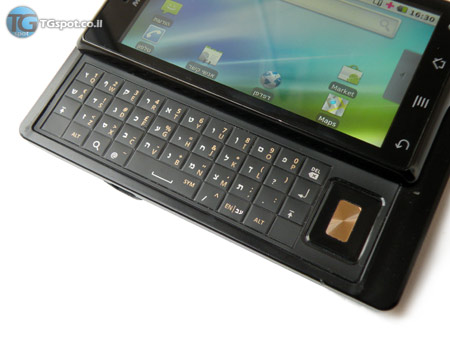
I can add this easily, but I need a picture of your physical keyboard
xslf
Hi and thanks for the quick replay. Enabling the option does not make a difference.

Here is a photo of the hard keyboard in devices similar to mine sold here: http://www.tgspot.co.il/wp-content/uplo ... estone.jpg

The only difference is that my device has the right menu key labeled with the menu icon instead of the language icon seen in the photo.
cyril Developer
OK, so I implemented hard keyboard translation for Hebrew in the latest beta version.
Note that you need to press comma for TET letter, and shift+comma to get a comma

Can you try it?
AmitMa
It is possible to change the keys that switch the language in the physical keyboard?
xslf
cyril wrote:OK, so I implemented hard keyboard translation for Hebrew in the latest beta version.
Note that you need to press comma for TET letter, and shift+comma to get a comma

Can you try it?
works fine, thank you! (And I think you mean the letter tav, not tet :-) )