Archived forum. This is a read-only copy of the Smart Keyboard community forum (2010–2015), kept for its history and its skins. Posts are shown as they were written, so some answers are out of date — see Help for current information. Want a post of yours removed? Email contact@smartkeyboardpro.com.
Select Text,Cut,Copy,Paste :)
nicky041192
I just got an idea for a future feature. On Android, if you want to select text/copy/past etc, you have to hold down the text box and select what you want. Which can be a bit lengthy to do your task.
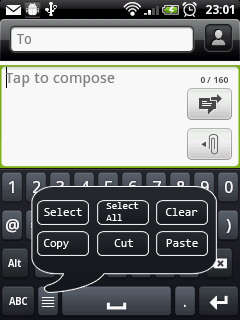
As you had allowed us to remove the comma key to make the spacebar bigger, perhaps you can add an option to replace the comma with a key that when pressed, a little menu will pop up consisting of:
Select Text Select All Cut Copy Paste
I haven't seen this feature implemented in any other keyboard.
OR, use gestures to activate the menu?
I'm sure this will be very useful to a lot of people including me!
Did a quick mockup you press the menu button to open the menu. press the button again to close. the menu covers the keyboard so it doesn.t cover the text box on the main screen like the default android menu does. I really hope this gets implemented soon!
Attachments
asdf.png
girlymissjulie
I would also love to see a feature like this, although not necessarily using the comma key because I prefer to have that key enabled because I use it all the time. I would love to see a cut, copy, paste button with the arrow keys, like it is with Swype. That is probably the only feature I actually really do miss from Swype because I used it a lot! This keyboard is amazing and, even though I am a huge Swype fan, this keyboard has won me over and that feature would definitely make it better than Swype, for sure!
nicky041192
I don't use the comma key. You can hold down the period key to get the comma so its no big deal. I personally prefer how i made it not having it on separate keys. It's simple, doesn't get in the way and looks nice
nicky041192
cyril, what's your input on this?
pgibby
This gets my vote - for me this is the only thing I really miss from Swype -would be a GREAT addition!
mightymaus
The comma also appears in the suggested punctuation in between typing words anyway, so for me that really wouldn't be an issue.
I like this suggestion a lot. It'd be a great function.
nicky041192
so cyril, can expect this to be implemented soon or does android not allow this?
cyrilDeveloper
It's definitely a bit of work, but I think it's possible to implement that
nicky041192
cyril wrote:It's definitely a bit of work, but I think it's possible to implement that
woo! i could really use this feature! No need to rush things
dan55
+1
spacebug
Hi,
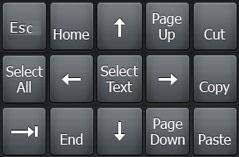
I tested lot of different keyboard, to have arrow keys, and Smart Keyboard is my prefered. The only think missing is special keys to simplify the text selection: Text_Select.JPG I propose the same position as numeric keypad for Home, End, Page Up and Page Down.
Below, we can have [ABC], comma, space, enter...
Best regards.
tmiv44
What about some kind of multitouch feature akin to cntrl+C or cntrl+V for copy and paste like on a computer keyboard. It could be mapped to the "?123" key, where you hold the key then tap "V" or "C". The blackberry keyboard has this feature built in using various combinations of the shift key, the apt key, and the track ball.
-Tm
nicky041192
tmiv44 wrote:What about some kind of multitouch feature akin to cntrl+C or cntrl+V for copy and paste like on a computer keyboard. It could be mapped to the "?123" key, where you hold the key then tap "V" or "C". The blackberry keyboard has this feature built in using various combinations of the shift key, the apt key, and the track ball.