Archived forum. This is a read-only copy of the Smart Keyboard community forum (2010–2015), kept for its history and its skins. Posts are shown as they were written, so some answers are out of date — see Help for current information. Want a post of yours removed? Email contact@smartkeyboardpro.com.

Palm/WebOS virtual key board

christianojeda
External image (i936.photobucket.com)

I found this online, of a rumored virtual Palm Keybaord and i really like it can someone please make it into a skin i understand that not everything will exactly like the photo but anything as close to it as possible would be great! thanks in advanced!
TheTehk17
I'm not so sure about the upper rounded corners (that would affect usability anyways) but I could try it.

EDIT: Skin is coming along nicely. Yes, there are some graphical issues, and some things that don't look at all like the picture above, but I'm working on them. I do have to say that this is quite possibly the easiest skin I've ever typed on.

It'll be done in a day or two.
christianojeda
finally a response! thanks alot for doing this, i under stand your concern with the rounded top keys, like i said in the original post, i understand that not everything will look the exactly the same,

as for the colors personally i dont care which every looks cleanest and simplest, but i like the middle/bottom rows! cant wait to see the finshed product!
TheTehk17
This post is where I'll ask for input from the forum- it's open to anyone.

Here's what I need input for:

1. The color of the shift lock indicator (you know, when you press the Shift key on the stock keyboard, how a green circle appears?). It's orange right now (temporarily!); the user below this post suggested a chalk blue/grey.

Let me know!
N1des
I think sort of a chalky blue/gray color would be best.

Sent from my Droid X that I can't wait to trade for a Thunderbolt using Tapatalk
TheTehk17
I've been told I could get sued for using the word 'webOS' in my skin. Anyone have an idea of what to call it instead?
TheTehk17
Here's what I have so far:
CAP201102222156.jpg
CAP201102222156.jpg
I'm almost done but have one problem. The grey line of pixels on the very left of they keys is stretching on the spacebar- as you can see, it looks horrible. Same thing on the Shift, Enter, and Backspace keys. I know whoever did the GlossBlack skin had a line of red pixels on the far left of his keys, but somehow they don't stretch on the Spacebar/Backspace/Enter keys. Any tips?

Besides that, how does the skin look? I set a transparent background and transparent keypress, I didn't show that here.

EDIT: fixed the problem. Now working on HDPI so I can release a complete skin.
christianojeda
Wow it looks really great! I like your decision to go with the transparent accent, I only have one question, in the photo it looks like the very last row's (where the space bar is) height is larger then the other rows, I'm not sure if its just the photo or if its actually like that, but in any case it makes the skin look a bit "off",

Either way can't wait to have this on my phone!
TheTehk17
christianojeda wrote:Wow it looks really great! I like your decision to go with the transparent accent, I only have one question, in the photo it looks like the very last row's (where the space bar is) height is larger then the other rows, I'm not sure if its just the photo or if its actually like that, but in any case it makes the skin look a bit "off",

Either way can't wait to have this on my phone!
It's the photo, the keys look the same height in-use. I can't change the specific height of the bottom row of keys anyways.

Besides that graphical issue mentioned above, the MDPI version is finished. I won't release the skin until HDPI is supported too, but I'm working on that right now.

Just wondering, are you using MDPI or HDPI?
TheTehk17
christianojeda wrote:Hdpi
Well, I fixed the problem mentioned above, so I can begin work on HDPI.

EDIT: HDPI coming smoothly. I ported the .png's from /drawable to /drawable-hdpi, so now I'm just cleaning up the keys to make them look clean.
TheTehk17
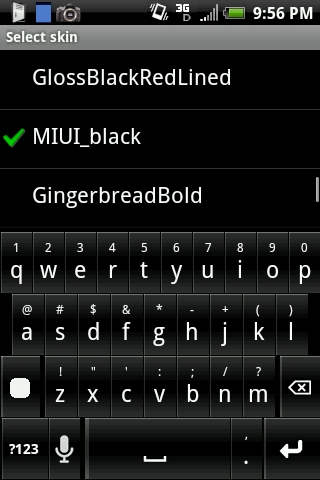
It is now done! It's under the topic 'MIUI_black'.

Hope you enjoy! :D
Kirara Young
I like the one with the rounded corners. It is pretty and glossy looking. :lol: :) :D :mrgreen: :geek: :geek: :geek:
TheTehk17
Kirara Young wrote:I like the one with the rounded corners. It is pretty and glossy looking. :lol: :) :D :mrgreen: :geek: :geek: :geek:
You can find the skin under the topic 'MIUI_black'.