Archived forum. This is a read-only copy of the Smart Keyboard community forum (2010–2015), kept for its history and its skins. Posts are shown as they were written, so some answers are out of date — see Help for current information. Want a post of yours removed? Email contact@smartkeyboardpro.com.
[UPDATED] MIUI_black1.2 (webOS skin)
TheTehk17
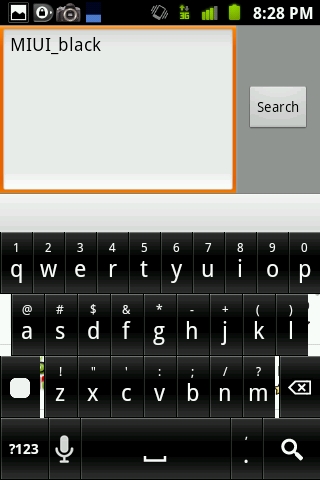
I am happy to release my first skin- this is the result of the Palm/webOS skin request. I couldn't call it that because I didn't want to infringe Palm/HP's trademark for webOS.
There are three versions of this skin- one with a completely transparent keypress/background, one with a black keypress/background, and one with smaller (chicklet) keys.They all support MDPI and HDPI- should work with any phone. Make sure to put it under the 'skins' folder in ur SD card!
I hope you all enjoy! Please let me know if you encounter a graphical bug, or if you find something that looks "off"!
Please note that my screenshots below made the skin's colors look a bit 'off'. That's just a trait of screenshots, this skin is not actually like that.
(files are under the screenshot) CAP2011022620281.jpg Here's the version with the completely transparent keypress/background:
v1.2- added FULL support for all HDPI devices, and adjusted black levels for HDPI AMOLED displays. Anyone that has this skin on an HDPI phone should update! v1.1- adjusted black levels for MDPI AMOLED displays.
To update: delete the old skin and download the current one in its place (sdcard/skins). If you keep the old skin, you'll end up with two skins
N1des
Thanks for your effort. But I just can't use it. The see-thru key press bothers me. Hate seeing text behind keys when I press them. Would rather an all black background.
Passing on this skin. But it is a perfectly good skin otherwise! Good job Dev =]
Sent from my Droid X that I can't wait to trade for a Thunderbolt using Tapatalk
TheTehk17
N1des wrote:Thanks for your effort. But I just can't use it. The see-thru key press bothers me. Hate seeing text behind keys when I press them. Would rather an all black background.
Passing on this skin. But it is a perfectly good skin otherwise! Good job Dev =]
Sent from my Droid X that I can't wait to trade for a Thunderbolt using Tapatalk
That is the kind of feedback that I can take into account and use to make better skins, like:
There u go I put the file into my original post, too, so others can see it right off.
7Stringer
I agree with the other poster - the non-transparent background just didn't work. The black background is much better. That being said, I'd prefer smaller keys with a touch lighter background to add a more 3d, popping effect. I like the color of the keys, but they blend together with the others almost too easily. This, too, is coming froma DX user.
TheTehk17
7Stringer wrote:I agree with the other poster - the non-transparent background just didn't work. The black background is much better. That being said, I'd prefer smaller keys with a touch lighter background to add a more 3d, popping effect. I like the color of the keys, but they blend together with the others almost too easily. This, too, is coming froma DX user.
The file 'MIUI_black1.1_no-transparent.zip' has a black background. I thought I said that clearly
I can work on a version one with smaller keys.
7Stringer
TheTehk17 wrote:
7Stringer wrote:I agree with the other poster - the non-transparent background just didn't work. The black background is much better. That being said, I'd prefer smaller keys with a touch lighter background to add a more 3d, popping effect. I like the color of the keys, but they blend together with the others almost too easily. This, too, is coming froma DX user.
The file 'MIUI_black1.1_no-transparent.zip' has a black background. I thought I said that clearly
I can work on a version one with smaller keys.
I know - hence why I said it was better . Keep up the good work, and thanks for the quick responses.
TheTehk17
7Stringer wrote:
TheTehk17 wrote:
7Stringer wrote:I agree with the other poster - the non-transparent background just didn't work. The black background is much better. That being said, I'd prefer smaller keys with a touch lighter background to add a more 3d, popping effect. I like the color of the keys, but they blend together with the others almost too easily. This, too, is coming froma DX user.
The file 'MIUI_black1.1_no-transparent.zip' has a black background. I thought I said that clearly
I can work on a version one with smaller keys.
I know - hence why I said it was better . Keep up the good work, and thanks for the quick responses.
Thanks for the feedback. I haven't had any chance to test on an actual HDPI device- only the emulator, and with an HDPI resolution, the screen size stretches to 7 inches. I'll try to finish it up today.
TheTehk17
7Stringer wrote:I agree with the other poster - the non-transparent background just didn't work. The black background is much better. That being said, I'd prefer smaller keys with a touch lighter background to add a more 3d, popping effect. I like the color of the keys, but they blend together with the others almost too easily. This, too, is coming froma DX user.
Updated the skin files on my original post. If you don't know how to update skins, instructions on how to do so are there as well.
I did all I could while staying in the limitations of Smart Keyboard. I think you'll like v1.2.
Let me know if it's better than v1.1.
christianojeda
looks great! thanks!
TheTehk17
christianojeda wrote:looks great! thanks!
Curious, I don't have HDPI, how does it look on your phone? Any graphics bugs?
7Stringer
Ah, much better. Thanks for the fix - this really helps. I like the shading and black background. Personally, I'd even prefer a slightly smaller key, but I also like the iphone-style keyboard a lot. I'd be willing to pay ya to do a slightly smaller key.
Oh, and no graphics issues. The fade is really nice - the keys have a great 3D effect. I find typing on it very easy.
TheTehk17
7Stringer wrote:Ah, much better. Thanks for the fix - this really helps. I like the shading and black background. Personally, I'd even prefer a slightly smaller key, but I also like the iphone-style keyboard a lot. I'd be willing to pay ya to do a slightly smaller key.
Oh, and no graphics issues. The fade is really nice - the keys have a great 3D effect. I find typing on it very easy.
A good skin dev shouldn't make his work into paid apps- unless it's a multiple skins-in-one deal and updates it frequently. Or, at least, that's my standard
Here is your version w/smaller keys (it's the non-transparent one):
Ah, this is much more my style. Thanks for the consistent reworking of the skin - I can get used to this one haha.
Thanks for the hard work.
TheTehk17
7Stringer wrote: I can get used to this one haha.
Does it need to be a bit smaller...?
7Stringer
If you're up for it, I'll gladly check it out. Perhaps slightly increase the gap on the top/bottom, too? Not just side-to-side?
christianojeda
TheTehk17 wrote:
christianojeda wrote:looks great! thanks!
Curious, I don't have HDPI, how does it look on your phone? Any graphics bugs?
Nope everything seems to be working great!
TheTehk17
The graphical bug with MIUI_black1.2_smallkey is now fixed. Users with that skin, please update using the file above ^^^
TheTehk17
7Stringer wrote:If you're up for it, I'll gladly check it out. Perhaps slightly increase the gap on the top/bottom, too? Not just side-to-side?
Sorry, was busy for a while. Anyways, I increased the top/bottom distance, and fixed a major graphical bug- everything should now be crisp and clean. The file is updated a few posts above this one ^^^
As always, just tell me if there's anything wrong!
hummerbr4
How do I install it to where I can use it to type with? I can't figure it out please p lease answer me
TheTehk17
hummerbr4 wrote:How do I install it to where I can use it to type with? I can't figure it out please p lease answer me
You will first need to create a folder in your SD card named skins. You can do this with any file manager, such as Astro or Androzip.
Then, download this skin using the links on the first post on the first page of this thread. After that, use the file manager to copy the skin into that skins folder you created.
To use, open settings<keyboard<smart keyboard<general<select skin.


 . Keep up the good work, and thanks for the quick responses.