Archived forum. This is a read-only copy of the Smart Keyboard community forum (2010–2015), kept for its history and its skins. Posts are shown as they were written, so some answers are out of date — see Help for current information. Want a post of yours removed? Email contact@smartkeyboardpro.com.

PLEASE add option to Show Arrows on Main Keyboard

AndroidUser
Hello Dexilog

Could you please please please please please please add an option to Show Arrows on Bottom Row!!! Please please!!

Similar to this HTC keyboard...

External image (i51.tinypic.com)

Best regards...
woopypants
what a great idea! cyril could u please add that to the t9 keyboard to?

i dont know if this will help or not, but i have my keyboard set so that when i swipe my finger upwards, it displays the arrow keypad (its a bit easier than flicking thru the different keyboards to access the arrows)
AndroidUser
I have it set the same way... swiping downwards will switch to the arrow keypad, but I think it would be much better to have a row with arrows at the bottom.

Best regards...
woopypants
yeah well there is an option to increase the padding at the bottom of the screen, so hopefully the arrows could get squeezed in there even?
cenozoite
Yes PLEASE add this feature, it is by far the number one thing needed to allow Smart Keyboard Pro to become a full hardware keyboard replacement! At the moment having to swipe or hit buttons to access the arrow keypad is just not convenient enough to facilitate frequent text editing. Arrow keys along top or bottom row, above or below main keyboard please! :)

By the way, which HTC keyboard is that in the screenshot? Is it Android or Windows Mobile..??
AndroidUser
cenozoite wrote:Yes PLEASE add this feature, it is by far the number one thing needed to allow Smart Keyboard Pro to become a full hardware keyboard replacement! At the moment having to swipe or hit buttons to access the arrow keypad is just not convenient enough to facilitate frequent text editing. Arrow keys along top or bottom row, above or below main keyboard please! :)

By the way, which HTC keyboard is that in the screenshot? Is it Android or Windows Mobile..??
I fully agree... the arrows would make a huge difference!!

As you can see the first screenhot is from my review of Smart Keyboard on Market. So the answer to your question is that it's indeed an Android keyboard. :)

Brgds...
cenozoite
AndroidUser wrote:As you can see the first screenhot is from my review of Smart Keyboard on Market. So the answer to your question is that it's indeed an Android keyboard. :)
Brgds...
After checking around I am guessing that screenshot is the default keyboard on the HTC EVO, rather than a third party keyboard. The only similar third party Android keyboard I've seen with arrow keys like those ones is Ultra Keyboard, which implements them pretty much identically to the screenshot shown. On my Dell Streak however, Ultra runs too slowly to allow fast typing, whereas Smart Keyboard Pro runs lightning fast and never misses keystrokes no matter how quickly I type. So adding the arrow keys to SKP would be the ideal solution in my opinion. They are just so completely essential for smooth and fluid text editing/correction.

Currently to correct a typo you must do:

Two taps of 123 button or swipe gesture, to switch to arrow keypad
Move cursor to desired position using arrow keys, and backspace over typo
Tap ABC button or swipe gesture, to switch back to regular qwerty keyboard
Type correct letter to fix typo
Two taps of 123 button or swipe gesture, to switch to arrow keypad
Move cursor back to original position
Tap ABC button or swipe gesture, to switch back to regular qwerty keyboard
Continue typing where you left off...

That is four different times you must switch layouts, in order to correct a typo. With arrow keys on the main layout it would just be:

Move cursor to desired position using arrow keys, and backspace over typo
Type correct letter to fix typo
Move cursor back to original position
Continue typing where you left off...


I know there is already consensus in this thread regarding this.. I am just really hoping the developer realizes the importance of implementing this feature.

Thanks!
OldDogEyes
cenozoite wrote: Currently to correct a typo you must do:
One question that I have for you is, why didn't the auto-suggest catch your typo? If you are using English and haven't installed the separate file that is needed, you won't get auto-suggest functionality. Also, if you've mistyped a word the same way before and it got added into your user dictionary, then that's preventing the auto-suggest from working. Check your user dictionary and prune out typo's... And you need to make sure that you don't have auto-suggest disabled in the settings...

While I agree with you that there are a lot of steps to fix a typo, the auto-suggest feature often helps me to avoid them if I keep my user dictionary cleaned up.

Let me know what you find...
Thanks,
Doug
imjehh
Yes, please add this feature, it would make smart keyboard pro so much better!
cenozoite
OldDogEyes wrote:One question that I have for you is, why didn't the auto-suggest catch your typo? If you are using English and haven't installed the separate file that is needed, you won't get auto-suggest functionality. Also, if you've mistyped a word the same way before and it got added into your user dictionary, then that's preventing the auto-suggest from working. Check your user dictionary and prune out typo's... And you need to make sure that you don't have auto-suggest disabled in the settings...
To be honest, the first thing I do on any device keyboard settings (physical or virtual) is disable all the text prediction, suggestion, auto-correction, dictionary type features etc. I guess I am just old school but I don't like my device or keyboard trying to think for me or modify what I type. I prefer to be in control of what I type, catch my own mistakes, and correct them manually, just like on a regular computer keyboard. Anyway though, fixing a typo was just an example of where arrow keys would come in handy. There are lots of times one wants to go back and edit something, even when there wasn't a mistake. Easily accessible arrow keys are needed for a full typing experience.
hannsoft
Just thought I'd chime in with a hearty PLEASE to this request! I just went from Eris to Thunderbolt, and the lack of the ability to do this when using my beloved Smart KB (used to have the trackball, but no more) is kinda like missing a limb: I'll get there .. but it won't be easy. ;-)

Many thanks!
BozQ
Me in for this option too!
Either at the bottom, like the HTC keyboard, or the top suggestion bar.
cyril Developer
It will be in the next version.
AndroidUser
Wow!! Thank you very much Cyril... Amazing!!
When this comes I'll gladly spam the forums where I'm active about your wonderful keyboard.

Thanks again... I can hardly wait!! Any idea of when this might be available?

Brgds...
cyril Developer
There are still some problems to solve but the beta will be available soon. The official version will be later as I already released a version this week, and this would be too much.
cyril Developer
I know you are all impatient so here is a preview of this new feature (just called "Show arrows") in the latest beta. Only portrait mode is supported at the moment, landscape will come later. Anyway you can already give your feedbacks ;)
AndroidUser
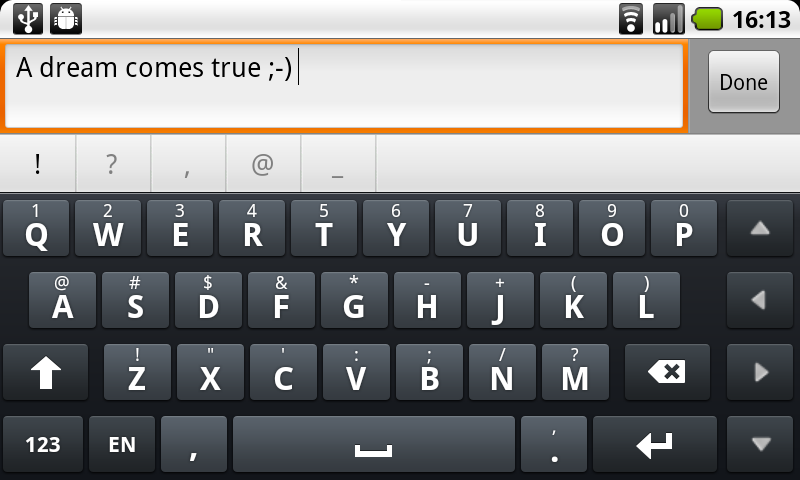
Thanks a lot for posting the beta Cyril!! It looks great!! Here's a screenshot of it with a Swedish layout. The arrow buttons works very well.

External image (i51.tinypic.com)

I've sent SMS with it and used it in many applications and I haven't found any bugs yet. I'm very happy right now!

Make sure you advertise this new function on Market when done. I think this is the only keyboard available on Market that can show both arrows and national keyboards at the same time! The other keyboard mentioned in this thread could display arrows but didn't give you extra buttons for national letters (in my case: å ä ö)

Brgds...
cyril Developer
Arrows in landscape mode are now supported as well. Same link as before.

Attachments

device.png
device.png
cenozoite
FANTASTIC, Cyril!! Excellently done and implemented as usual, thank you, and Smart Keyboard Pro is now truly the unrivaled number one premiere keyboard on the Android platform, by far, bar none. Enabling actual typing on touchscreen devices everywhere! :)
AndroidUser
Just gotta say thanks once again. I attended a meeting today and didn't bring pen & paper... boy did the new SmartKeyboard save my day. It's so much easier to do word processing with the arrow keys present. Really very well done Cyril!!

Brgds...
cenozoite
Yep, there's nothing like a great product supported by a responsive developer, and this latest enhancement really turns SKP into a true hard keyboard alternative. The convenience of the arrow keys combined with the already existent speed and accuracy of Smart makes it the king of the keyboard jungle, and changes the overall touchscreen typing experience on Android from "frustrating and challenging" to "fluid and easy". Kudos galore! :D

By the way, no rush or urgency on this whatsoever, but now that we have the awesome arrow keys, a nice additional feature would be to be able to use them in text selection mode. Meaning, text selection mode is turned on through either a gesture or long press of some sort, after which moving the cursor with the arrows selects text letter-by-letter, just like a regular computer keyboard, and then cut/copy/paste operations can be done through the normal Android system menu. Again though it's no major priority as just having the arrows is fantastic enough already, but down the road it might be a cool extra feature to consider..

Thanks again!
hannsoft
Hi Cyril!

Thank you SOOO much! The arrows are perfect! One thing missing, though - is the ability to turn them on and off (unless it's there and I don't see it). See, some apps are designed in such a way that, when an "arrowed" keyboard that's larger than the stock keyboard (as Smart Keyboard is) is used, the actual text input box is shrunk so small that it's virtually unusable. You can't read what you're typing. So we'll need to be able to turn these arrows off sometimes. Is that possible?
AndroidUser
hannsoft wrote:Hi Cyril!

Thank you SOOO much! The arrows are perfect! One thing missing, though - is the ability to turn them on and off (unless it's there and I don't see it). See, some apps are designed in such a way that, when an "arrowed" keyboard that's larger than the stock keyboard (as Smart Keyboard is) is used, the actual text input box is shrunk so small that it's virtually unusable. You can't read what you're typing. So we'll need to be able to turn these arrows off sometimes. Is that possible?
I just lowered the key height slightly... works very well :)

Brgds...
tmiv44
AndroidUser wrote:I just realized I forgot to post the landscape keyboard... here you go.

External image (i52.tinypic.com)

So I guess the option should be called Show Arrows on Main Keyboard.

Best regards...

Maybe I'm the only one, but I hate the arrows on the keyboard on the default HTC Thunderbolt keyboard. It was my desire to get rid of them that sent me looking for a new keyboard (and of course led me to Smart Keyboard).

I don't mind the arrows in portrait view, but hate them in landscape view. Maybe these four be seperate options ?


However I really like the way the Gingerbread keyboard does it where you hold the space bar and slide up/down to show/hide the arrows.

-Tm
hannsoft
But that's not an easily toggled change, if I understand you correctly.

But that does remind me of another nit. I wish we could have numeric values on that key height dialog! So we could know what we'd set it to and how to get it back ....

Sent from my Thunderbolt using Tapatalk
foruum
It will be great to add also buttons for copy, cut, paste, undo actions on main page or at least to add these buttons on on Arrows page, just expanding Only Arrows style to Arrows with Clipboard.
nicky041192
give us the option to only enable the arrows only in landscape or in portrait mode :D