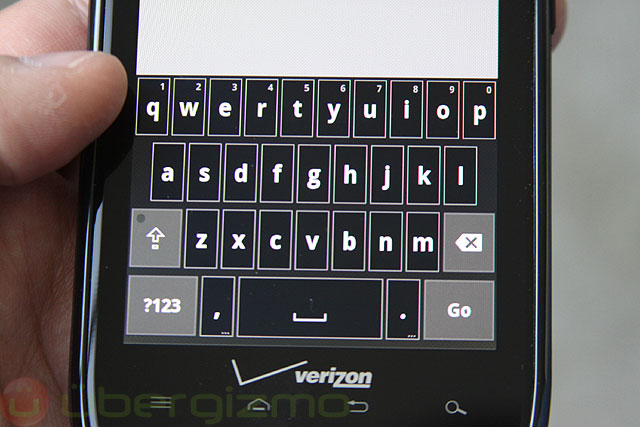
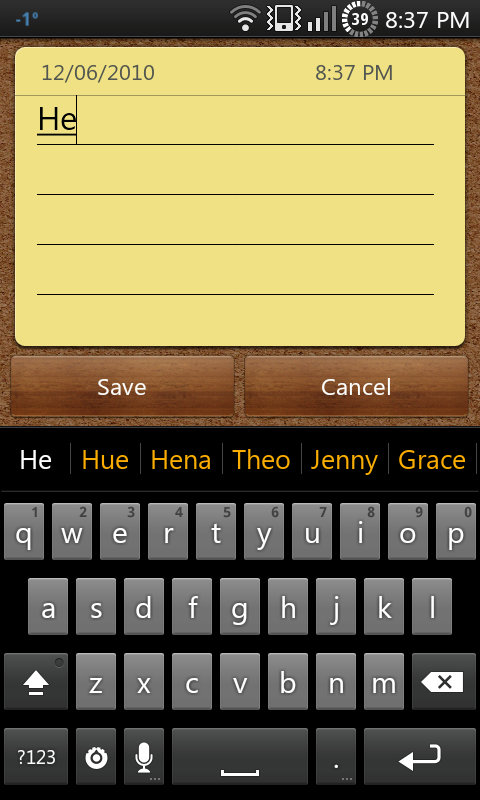
If someone would create, that would be fantastic!!!! 
Request: Gingerbread skin
I would love to see this as well. I love the look of the gingerbread keyboard but it sux that theres no multitouch
With smart keyboard pro, there is multi touch... 
here's one...
Hotaru, it is very nice!!!!!! Thanks! Wondering if text prediction box could be edited too???
External image (www.xda-developers.com)
Doesn't work properly on Desire HD. (no shift, del, enter shown)
Shows the same problems of the Cupertino Skin. (See here: http://www.dexilog.com/smartkeyboard/fo ... 3595#p3594)
Hi .. nice work on the skin but can u make one with bold letters and numbers
babandas wrote:Hi .. nice work on the skin but can u make one with bold letters and numbersyes, i can.
Hi, the real gingerbread keyboard has low case bold letters, I know its a lot to ask, but could some one make this, so it looks really realistic. Thanks very much 
dsf wrote:Hi, the real gingerbread keyboard has low case bold letters, I know its a lot to ask, but could some one make this, so it looks really realistic. Thanks very muchthe bold version i posted has all the letters bold, including lowercase... not sure what you're asking for.
the bold version looks almost identical to it. The gingerbread keyboard with multitouch equals badass!
Honestly, this is brilliant. I'm happy it is a future stock google keyboard, but happier you developed it pre-release, and with such a clean interface. This and the Cupertino will be my go-to's for quite a while. Kudos.
Ive got one request for the bold version can u please make the entire bottom row of keys the darker color just like the offical gingerbread one is and add the orange line at the bottom of the space bar? Then it would be almost identical
chris6278 wrote:Ive got one request for the bold version can u please make the entire bottom row of keys the darker color just like the offical gingerbread one is and add the orange line at the bottom of the space bar? Then it would be almost identicalAgreed. If the bottom row color could be fixed and an orange line added, it would be perfect!
chris6278 wrote:Ive got one request for the bold version can u please make the entire bottom row of keys the darker color just like the offical gingerbread one is and add the orange line at the bottom of the space bar? Then it would be almost identicali don't think it's possible for a skin to make the bottom row all the darker color (except by making all the keys on the keyboard that darker color)... that may be a feature to request in a future version of SKP...
as for the orange bar... i tried it and that orange just looks bad without the spacebar being dark.
edit:
i got a crazy idea... this is a very ugly hack, and it doesn't really work very well, but i did get the whole bottom row the darker color!
this neat little trick becomes not so neat if you hit the symbol key.
Hello!
Could you optimize this for Samsung Galaxy 3 phone? (240x400 px)
Thanks!
Could you optimize this for Samsung Galaxy 3 phone? (240x400 px)
Thanks!
Is it possible to have the dictionary row in dark orange as well, like GB?
Easily my favorite skin posted on here (non-bold version) except that the alternative text on each key is so dark its virtually impossible to read - Droid 1 - for that reason, I can't use it :/
skateco wrote:Easily my favorite skin posted on here (non-bold version) except that the alternative text on each key is so dark its virtually impossible to read - Droid 1 - for that reason, I can't use it :/+1 another contrast color to button color would make them much more visible. Green gingerbread skin so far is the best
Sent from my Dell Streak using Tapatalk
I really like hotaru's GingerbreadBold skin. I just have one request for anyone who is proficient in image editing.
I know this is a REALLY niche request, but I only request one edit to a few files, namely normal_on.9.png and pressed_on.9.png. They both have a "light" that is greenish-yellow. If anyone could edit them so it is cyan, it would be GREATLY appreciated
c00ller wrote:I really like hotaru's GingerbreadBold skin. I just have one request for anyone who is proficient in image editing.I actually opened up paint.NET and learned about the Recolor tool
I know this is a REALLY niche request, but I only request one edit to a few files, namely normal_on.9.png and pressed_on.9.png. They both have a "light" that is greenish-yellow. If anyone could edit them so it is cyan, it would be GREATLY appreciated
Before:
External image (dl.dropbox.com)
After:
External image (dl.dropbox.com)
For those interested, it's attached below. Thanks to hotaru for the original Gingerbread keyboard theme
How about one with the keys black and one with the background white?
Something seems to be wrong. The colors that should be cyan are white, any ideas?
jeckert21 wrote:Something seems to be wrong. The colors that should be cyan are white, any ideas?Look at my screenshots and read my post again, the only thing that I made cyan was the caps lock light. Other than that it is normal Gingerbread. If you want every key to be cyan colored, just open the skin.xml to change the values under <color> to the ones you want.
c00ller wrote:Hi many thanks to the autor of this skin and to you,c00ller wrote:I really like hotaru's GingerbreadBold skin. I just have one request for anyone who is proficient in image editing.I actually opened up paint.NET and learned about the Recolor tool
I know this is a REALLY niche request, but I only request one edit to a few files, namely normal_on.9.png and pressed_on.9.png. They both have a "light" that is greenish-yellow. If anyone could edit them so it is cyan, it would be GREATLY appreciatedI'm an image editing novice so it's not perfect but it does the job, at least on mdpi. I don't have an hdpi device to test but I imagine it would look fine. The only thing I changed was the color of the caps lock indicator on the shift buttons, normal_on.9.png and pressed_on.9.png
Before:
External image (dl.dropbox.com)
After:
External image (dl.dropbox.com)
For those interested, it's attached below. Thanks to hotaru for the original Gingerbread keyboard theme
Looks very nice on my HTC Desire CM7 theme cyanbread
I was wonderin' can u make a light pink and a margenta keyboard?
Can you outline the keys on the bold one in white?
Attached is what I am looking for/--Thanks!