Archived forum. This is a read-only copy of the Smart Keyboard community forum (2010–2015), kept for its history and its skins. Posts are shown as they were written, so some answers are out of date — see Help for current information. Want a post of yours removed? Email contact@smartkeyboardpro.com.
Prediction bar not working
fetteente
In the text field of the stock email app (Gingerbread Galaxy S), the prediction bar and autotext is not working. In all other fields and other apps, it works!
cyrilDeveloper
Hello Do you have the "always suggest" option on?
AlphaGeeK
cyril wrote:Hello Do you have the "always suggest" option on?
It's not working for me either and I do have "always suggest" switched on.
Do you mean the prediction bar doesn't appear, or is it empty? Does portrait/landscape make a difference?
AlphaGeeK
The prediction bar does not appear in portrait or landscape mode.
AlphaGeeK
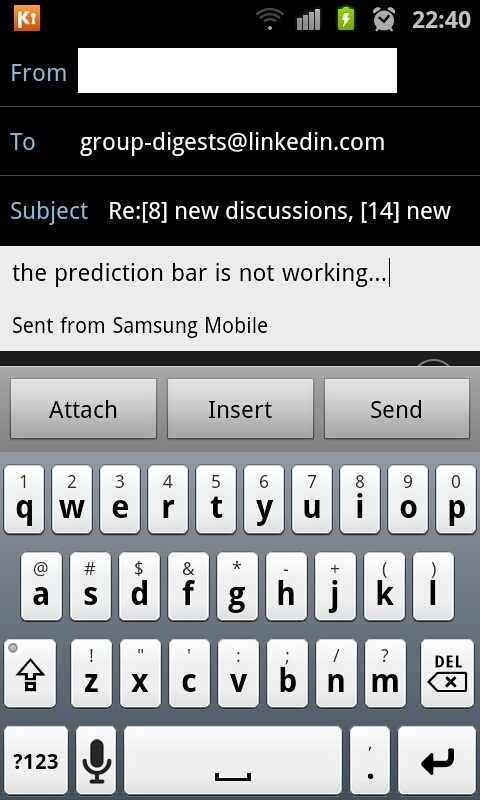
This is what happens.
There isn't even a capital entered as the first letter of what I typed in.
Attachments
SC20110520-224017.jpg
anshkhanna
I have this issue too...using Smartkeyboard pro with SGS II. Also experience this with other third party kbs...such as Swiftkey etc. Maybe an issue with SGS II firmware. Either way an early resolution of this would be greatly appreciated. Thanks
AlekseiA
Hi, I kindly ask you to fix those problems ASAP. Not working T9 prediction as well as Auto-capitalization in SG S2 email client at all. Tried every 3rd party keyboard. Only with Perfect Keyboard T9 works but Auto - capitalization now way. I do prefer to stay with Smart Keyboard obviously. Also sent request to Samsung guys to fix their email stock client but don't think they could make it promptly. Thanks a lot. A
AlphaGeeK
Just flashed my GS2 with the latest firmware PDA:KE7 / PHONE:KE4 / CSC:KD1 (XEU) and still no prediction bar or auto capitalisation etc. in the stock email app.
cyrilDeveloper
Is there a way to get the apk of this email app?
anshkhanna
Are the developers planning to respond to these messages? I was initially of the belief that this is a Samsung issue. But after seeing the text prediction work in stock email client using Perfect Keyboard, it seems like the issue can be overcome by the keyboard developer by fixing the code in the software itself. So please help!!!
cyrilDeveloper
What am I supposed to respond? I don't have a SGS II so I cannot reproduce this problem at the moment. I will do my best to do a workaround to this Samsung bug when possible.
cyrilDeveloper
Anyway what I will do is add some debug logs so that (hopefully) people who get this issue can give me more information.
dennismeng
Hi,
I too have this issue. No suggestions when writing emails. I also tried to switch back to standard keyboard as well as swype, and none of those comes up with suggestions either (did in the beginning). Tried to uninstall SKP completely and restarted the phone, still no suggestions.
Now SKP is re-installed again, but suggestions still hasn't returned (didn't expect them to)
janusz08
Hi, I have got the same issue on Galaxy Tab after upgrading os to 2.3.3.
Any chance to get it fixed quickly?
anshkhanna
Can the developer please help...we are desperate!!!
cyrilDeveloper
I need your help as I have no way to reproduce this problem.
Please install this version, install "Log Collector", enable debug logs in keyboard advanced settings, open the keyboard in the mail app, and just after send your logs by mail to smartkeyboard at dexilog.com. Also please tell me exactly at what time you opened the keyboard in the mail app. Hopefully the logs will give some information.
anshkhanna
Have done as per above post and emailed log to smartkeyboard@dexilog.com Please acknowledge receipt.
cyrilDeveloper
I already replied to your mail
anshkhanna
Resent bug log.
cyrilDeveloper
OK, so I think I see where the problem comes from (if it's what I think, it's NOT a bug, it's just that the mail app explicitly asks the keyboard NOT to display suggestions). Can you try again the beta version? If "always suggest" option is on, it should work. Otherwise please send me logs again, I added more information to see why suggestions would not be displayed.
anshkhanna
Have sent fresh log just now with the beta version in above post. Still no prediction/auto correct in email body. You may however norice following - 1. The prediction and auto correct work in the subject field - so its clearly not an apk problem but problem limited to body field. 2. Prediction works with Perfect Keyboard which is also a third party keyboard. So there definitely is a way to overcome it.
cyrilDeveloper
So, we are close to a solution. Thanks to the logs, I saw that predictions are off because this email app uses a non-documented class of input. I did some change in the latest beta (same download link), and this time predictions should remain on even in this situation.
anshkhanna
Congrats Cyril . You finally got auto correct and predictions working in the email body app. The only functions which are still not working are auto capitalize and double space for full stop. Anyways I guess one can live with this. Please upload final version to Market.
AlphaGeeK
Yes, prediction bar working on Samsung Galaxy S2 with the beta version. As stated, still need auto-caps etc investigating.
Good work.
janusz08
Hi, The issue is solved on my Galaxy Tab with Gingerbread 2.3.3 too. Thanks a mill.
cyrilDeveloper
Sorry but this change has introduced a big regression, and now suggestions are enabled in many apps, whereas they should not.
I tried to enable them only in Galaxy S2 mail client, can you try the latest 4.2.3 beta and let me know if it still works? Thanks
janusz08
Version 4.2.3 works fine for me as well. But I tested this on Galaxy Tab with Gingerbread 2.3.3.
schrochem
I'm not sure if its related but some entry fields in dolphin hd browser it shows the predictions but doesn't have the "candidate" showing and then selecting it. Its working fine in this reply box but if I go to Google its totally different. Most words wont have a candidate but some will. An example is "the" doesn't but "isn't" does. So it might be related to my auto correct dictionary.