Archived forum. This is a read-only copy of the Smart Keyboard community forum (2010–2015), kept for its history and its skins. Posts are shown as they were written, so some answers are out of date — see Help for current information. Want a post of yours removed? Email contact@smartkeyboardpro.com.

Droid X skin request

microdot
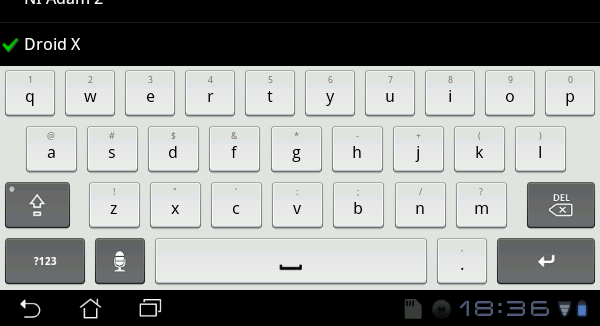
I wanted to see if someone would be willing to create a Droid X skin. I think the ginderbread skin is the closest to the skin to that i want and may only require some minor changes or maybe only color change. I own a thunderbolt but use to own a Droid X. I love that keybaord but i guess they have been unable to port it to froyo roms. Like i mentioned the smart keybaord layout is very similar and the gingerbread skin to me mimics the design and shape of the dropid x keybaord. I think if someone just changes the keys to like a light light grey and make the background white wit would look just like it. I PM'd the creator of the gingebread skin but thought i would post it here if anyone else is up for it.

here is a picture of the actual droid x keybaord I wanted to see if you would be willing to create a Droid X skin.

http://www.droid-life.com/2010/06/24/do ... m-droid-x/
microdot
You are the man!!! I wanted to do it myself but i have not learned to make skins yet. I read the instructions and tried to download abd but thats as far as i got. Hopefully i can learn it and return the favor and make some neat skins. Thanks again!!
microdot
Wow, that is impressive. Spot on! Thank you very much and nice work. I really appreciate it.
meyergre
just saw the other post, didn't know there was already a Droid X theme around here :?
anyway, I didn't use a picture as background for this skin, if you want a black background, just open the XML, and change the colors between the <Background> tags to these ones :
#FF000000 (for top-color)
#FF000000 (for bottom-color)
;)
garcia8907
Can you please make different colors in the keypress? blue, pink, green anything else but red. I really like this skin! Thank you.
schrochem
Another great skin! In Photoshop I tried changing the red to a blue for pressed9 but I failed once again. The color that's really cool that you've used before is 697AA8. Would love to see it.
schrochem
While I like the shade of blue I mentioned above better, someone has a close version of the droid with blue press here.
http://www.dexilog.com/smartkeyboard/fo ... f=13&t=616
3rd post down.
I tried again to change the pressed.9.png with proper transparency. Once I do that I just get a all black keys and background with white font.....
meyergre
Post your file, i'll give it a look ;)

Sent from my Adam using Tapatalk
schrochem
unfortunately it's at my office.
I was ummm 'working' and just happen to have photoshop open and then these png files just appeared...
just don't tell my boss.
I basically took the pressed.9.png and did a magic wand to select the color.
the filled it with paint bucket with the color I mentioned above, then lowered the fill and opacity on the layer.
I saved it and zipped it all up and.......
meyergre
Got it. Not sure it's the best way to change the color : try selecting the button area, then Picture > Settings > Hue/Saturation and play with the colors. the result should be identical to what you expected, and it should not "break" the 9-patch picture.