Archived forum. This is a read-only copy of the Smart Keyboard community forum (2010–2015), kept for its history and its skins. Posts are shown as they were written, so some answers are out of date — see Help for current information. Want a post of yours removed? Email contact@smartkeyboardpro.com.

How to install skins

JonM
Finally got this to work! YES!

So basically I ended up giving ASTRO file manager a go, downloading the .zip skin file directly from the phone (you have to enable an attachment preference in ASTRO settings to ensure it downloads files sucessfully), then moving it into the mnt/sdcard/skins folder. Then it magically appeared in the settings in Smart Keyboard Pro.

Glad I got it sorted.
Jackie
I did everything the instructions said and still nothing happened . Still don't have the keyboard I downloaded
TheTehk17
Jackie wrote:I did everything the instructions said and still nothing happened . Still don't have the keyboard I downloaded
Put the zip file of whatever skin you downloaded into /sdcard/skins. If the skins folder is not there, create it my using a file manager or a terminal emulator:
$ cd /sdcard
$ mkdir skins
newcube
FYI - to see the skins on a Galaxy Note you need to create a new folder called skins in the /sdcard folder which IS NOT the actual SD card in the phone! The external card sits at /sdcard/external_sd so putting the skins folder there does not work.
superleeds27
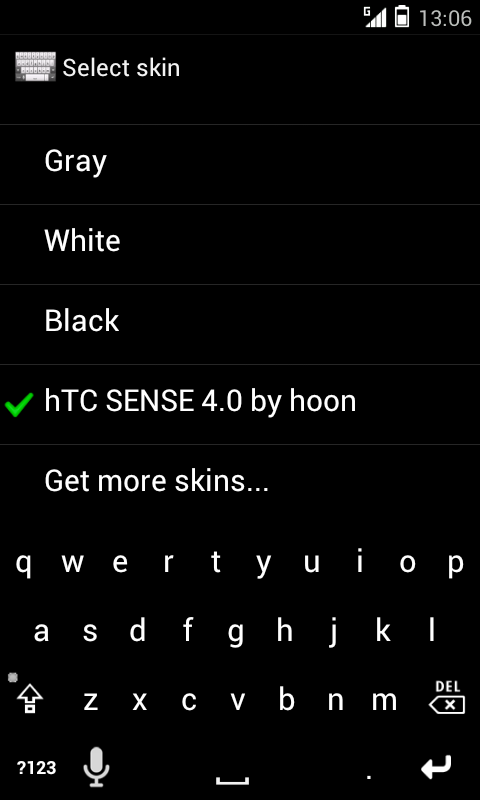
Any reason why im seeing this?

For the record its the HTC Sense 4.0 Skin 1.1

Attachments

Screenshot_2012-06-29-13-06-17.png
NoPodi
superleeds27 wrote:Any reason why im seeing this?

For the record its the HTC Sense 4.0 Skin 1.1
+1 - have no idea why this is suddenly happening.
i tried *sdcard* and *emmc*. it doesn't matter ... pls help!
NoPodi
NoPodi wrote:
superleeds27 wrote:Any reason why im seeing this?

For the record its the HTC Sense 4.0 Skin 1.1
+1 - have no idea why this is suddenly happening.
i tried *sdcard* and *emmc*. it doesn't matter ... pls help!
ok i got the solution. if you are on a rooted custom ics at least.

This should solve the problem:
https://play.google.com/store/apps/deta ... aW5kZXIiXQ..
chrissul
I just joined today been reading the create skins directory onto my sd card is that the phones memory or external sd card.tried both and cant get it to work using samsung galaxy w
love_indulgence
hi cyril, appreciate if you could assist.

downloaded skins from another app and it was supposed to show up in smart keyboard skin listing but it didnt. my friend got it by just installing the skin app and it appeared in her skin listing. i tried creating skins folder in root of sdcard and rename file to .zip but it doesnt help. please let me know the correct way of doing it as i really wish to change the skin for my keyboard. thanks in advance.
virenault
Hello
I hope someone will can help me.....
I'm french so i didn't really undrestand everything but i just have one question....
I would like to install a skin on my phone (glowkey blue), i dowlowned it on my phone but i can't open it..... :?
can someone help me to understand why or explain me how to do to use it ????
Thank you
realgman1969
omg I must be a freaken idiot. None of this makes any sense to me. Why Cant they just put the skins on the market like everyone else. This is way to hard and way to much work for a keyboard skin wow
CLMoses
I have followed all the instructions to the letter, however the downloaded skin does not appear at the bottom of the skins list. Although the instructions state that if it dies not then you must have done something wrong, however, I have confirmed that all the steps were completed correctly.
IqbalImanudin
cyril wrote:To install the skins you will find in this forum, you just need to:

1) download a skin (a .zip file) from the forum. With some browsers such as Safari you may need to right click on the file name and choose "Save as..." in your browser, instead of just clicking on it. Warning! Your browser may want to save the file as "file.php"; if it is the case you must change the name, it must end with ".zip" extension, otherwise the skin will not appear in the list!
Note that you must not use Android Tapatalk app to see the download links on the forum! Use a normal browser instead.

2) once downloaded, copy (don't extract!) the corresponding .zip file to your SD card in a directory named "skins". You need to create this "skins" directory at the root of your SD card, if it doesn't exist.
You can do it directly from your phone with a File Manager (like "Astro File Manager"), otherwise plug your phone to your computer, turn on USB storage, and copy the file from your computer to the SD card (don't forget to create the "skins" directory if it doesn't exist). The skin should appear at the end of the skin list in the keyboard settings. If it doesn't, read the instructions again as it means you did something wrong!

If the keyboard appears all black when you load the skin, it means there is an error in the skin (for instance it doesn't support your phone resolution). In that case please report it in the forum so that the author of the skin can fix it
estlo505
Now how and where do I find the skins? :roll:
brow
:?: i'm so sorry to ask about very very easy qurstions(for u all the expert) but it's very diffcult to me. i just want t kno how to get zip.file. i mean whats the url to get this skin. i've made skin folder in sd root but i don't know how t get the file. to change extension from .php to .zip i undwrstand. but to get the file address i dont kno. i want to get HELLO KITTY skin. please someone help me from this basic problem(for u all) but big for me. thx