Archived forum. This is a read-only copy of the Smart Keyboard community forum (2010–2015), kept for its history and its skins. Posts are shown as they were written, so some answers are out of date — see Help for current information. Want a post of yours removed? Email contact@smartkeyboardpro.com.
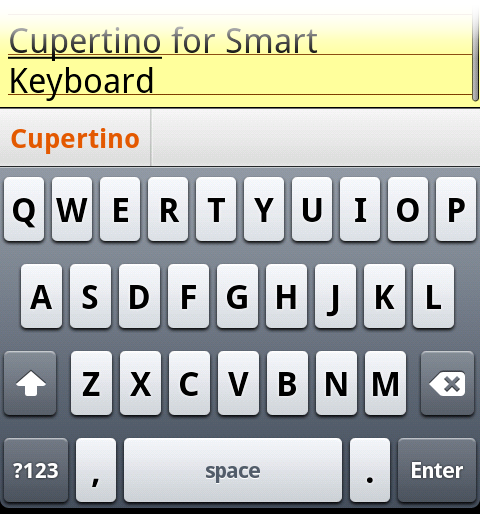
Cupertino for HVGA and WVGA
zen
Updated (Nov 12) Now available in hi-res. I'm especially happy with the small filesize; ~32kB is pretty nice Note: Not optimized for QVGA and tablets.
Cupertino For large- (N1, Galaxy S, Desire) and medium-size screens (Aria, G1, Hero, Moment, myTouch) Download here:
Oh great a real iPhone skin! May I ask for a HDPI version? I can give you a screenshot of an iPhone 4 if it can help you, but I'm sure you know much more than me how to do this I would dream of this being the default skin instead of my (ugly) iphone skin!!
zen
cyril wrote:Oh great a real iPhone skin! May I ask for a HDPI version? I can give you a screenshot of an iPhone 4 if it can help you, but I'm sure you know much more than me how to do this I would dream of this being the default skin instead of my (ugly) iphone skin!!
LOL Alright, I'll try to make time for drawing the hi-res files. Making things for Retina display is simple; just double everything up and add extra detail. But WVGA is about 1.5 to 1.6 x HVGA, so it's a bit more tricky to scale the drawings just right for them to not look weird. We'll see how it turns out. Thanks Cyril.
nick.koutrelakos
Yes, please make this skin for higher res devices like my incredible. It looks awesome.
bolsa
I've been looking for an iphone skin. This one resemble the iphone more than the skin that came with smart keyboard pro. Please make a higher res version.
Zarch
bolsa wrote:I've been looking for an iphone skin. This one resemble the iphone more than the skin that came with smart keyboard pro. Please make a higher res version.
Hear Hear...... although the current version still looks great..... top work!
bolsa
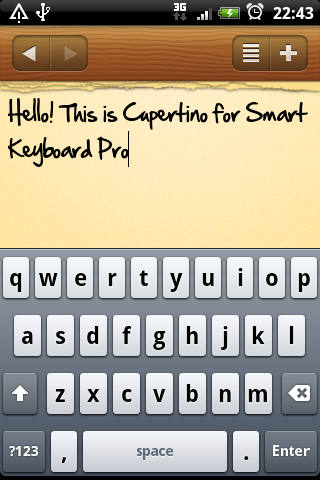
btw what app is that in the picture?
zen
Yes, the hi-res is coming.
bolsa wrote:btw what app is that in the picture?
Just a little weekend project I've been working on. Not finished yet.
LuwNL
Love it Zen...
Thanks!
Blitzie
Forgive me, I'm new to this whole thing.
I would like to download this skin. I can find it in Astro, but I don't know what to do from there. Help?
bolsa
Creat a folder in the root of your sd card and name it "skins" then put the zip file you downloaded in that folder. From there the skin should be selectable under general settings.
Blitzie
THANKS! Perfect explanation.
Zarch
Blitzie wrote:Forgive me, I'm new to this whole thing.
I would like to download this skin. I can find it in Astro, but I don't know what to do from there. Help?
Any ETA on the high-res version of this? It's just so beautiful..
kino
I too am anxiously awaiting for the hi-res update to this beautiful skin!
JOS
Same here. Can't wait for it to arrive. The best skin so far that I've tried.
fekish
would there be that much difference? Yes this is the one i used also most of the times, so clean and minimal style... Very easy for eyes...
bigriot
Looks great in portrait mode but kinda looks vertically squashed and simply just not right in landscape mode.
Sent from my GT-I9000 using Tapatalk
cyrilDeveloper
Looks great in portrait mode but kinda looks vertically squashed and simply just not right in landscape mode.
Indeed, that's why the built-in iPhone skin has different images for landscape mode, otherwise it just doesn't look good. However different images for landscape are not supported currently in the skin engine...
rvschuil
Awesome skin! Thanks a lot. Also, what notes app are you using? I still need a decent notes application, and yours looks nice.
zen
rvschuil wrote:Awesome skin! Thanks a lot. Also, what notes app are you using? I still need a decent notes application, and yours looks nice.
It's a self-made app, not yet released. Have you tried Catch.com? they make pretty decent notes apps (AK Notepad, Catch)
zen
cyril wrote:
Looks great in portrait mode but kinda looks vertically squashed and simply just not right in landscape mode.
Indeed, that's why the built-in iPhone skin has different images for landscape mode, otherwise it just doesn't look good. However different images for landscape are not supported currently in the skin engine...
Maybe the latest Beta can help. Both key height in Portrait and Landscape modes are adjustable now.
eolsgaard
This looks so awesome... would it be possible to make some different color variations? This one is tinted sort of blue-ish, but maybe there could be a reddish one for the droidies, android green, or a hue-less grey version. The design on this is the best I've seen so far! Depressing the keys looks wonderful.
zen
eolsgaard wrote:would it be possible to make some different color variations? This one is tinted sort of blue-ish, but maybe there could be a reddish one for the droidies, android green, or a hue-less grey version.
I don't have any plans to re-release this in different colors. But, with a little effort, you can make them yourself though.
All the key files themselves are already tintless and translucent so that they adapt with whatever color the base has. The only thing left to modify is the base container (take a look at bg.9.png file) which you can easily shift its hue or saturation. If you drop the saturation, you'll even get one that looks almost exactly like my other skin Chiclet!
Share yours on this thread so others can enjoy too.
eolsgaard
zen wrote:
eolsgaard wrote:would it be possible to make some different color variations? This one is tinted sort of blue-ish, but maybe there could be a reddish one for the droidies, android green, or a hue-less grey version.
I don't have any plans to re-release this in different colors. But, with a little effort, you can make them yourself though.
All the key files themselves are already tintless and translucent so that they adapt with whatever color the base has. The only thing left to modify is the base container (take a look at bg.9.png file) which you can easily shift its hue or saturation. If you drop the saturation, you'll even get one that looks almost exactly like my other skin Chiclet!
Share yours on this thread so others can enjoy too.
I'll give it a shot! Thanks zen!
zznh
Hi How can I remove the numbers above the letters? On my HTC Hero looks like this:
zznh wrote:Hi How can I remove the numbers above the letters?
There's an option in General settings; "Show alt labels."
toufic
Blitzie wrote:Forgive me, I'm new to this whole thing.
I would like to download this skin. I can find it in Astro, but I don't know what to do from there. Help?
create a folder on the sd card of your phone call it " skins", download cupertino.zip for example, and add it inside the "skins" folder. Load the sd card on your phone and the skins list will include the skin. the skins in the folder always end with ".zip"
Dam
Skin looks wonderful.
It has a bug on my DesireHD though. It doesn't show any icons on my shift/backspace/spacebar/enter keys. It shows the grey key itself but theres just no icon or text on the key. The other keys look normal.
Problem persists on landscape BTW.
Dam
Just switched to English keyboard language. It doesn't show the speach input icon either.
Also some more info: on the bugged keys: the pop-up version of the keys look normal (the version u see after pressing the key)


 Thanks Cyril.