Archived forum. This is a read-only copy of the Smart Keyboard community forum (2010–2015), kept for its history and its skins. Posts are shown as they were written, so some answers are out of date — see Help for current information. Want a post of yours removed? Email contact@smartkeyboardpro.com.

Honeycomb skin

meyergre
It's only a draft on this picture ;)

I though I could do it yesterday but I couldn't find time...
Anyway, let's say it will be downloadable "soon" :?
kromonos
Hehe ... don't stress and keep cool :)
schrochem
I like this new version. The blue is very cool.
dan55
looks awesome. shall download now :-)
cheers
dan
schrochem
meyergre I love this keyboard color scheme.
However, I notice I'm more accurate with the size of the iphone keys (the one that came with skp).
Maybe it's the gaps....
I'd love it if it had the same exact dimensions and layout but with your kromoneycomb color combo.
Nice work.
dan55
hi

I noticed similar. I've always wondered if more gaps would help
cheers
dan
meyergre
here it is, with a more important gap.
If it's not enough, tell me your phone's resolution. This one is optimized for low-resolution screens, that's why the distance is this much little between the keys. ;)

But anyway : notice that the picture of the key is only a background, the keys themselves doesn't have any real gap between each other. :geek:

Attachments

Kromoneycomb.zip 28.7 KB · downloaded 1,233 times

schrochem
Hey thanks meyergre,
I was thinking of a more significant gap but I see that's a major rework.
I started reading the 'create your own skins' thread and put in a request for the iphone.zip that came with skp.
I'd like to give making a skin a whirl....
I was thinking (but not so sure since I've never done it) that I could take the png files from the iphone skin and recolor them.
Anyway, it seems like an easy starter project....
I have a thunderbolt with 480X800 I believe.
Thanks again.
meyergre
Well, it's not a big deal in fact. Once the PNG is drawn, i just need to add some transparent pixels on each side to increase the gap ;-)

Sent from my Nexus One using Tapatalk
schrochem
Hey meyergre,
After looking at your visual tutorial I'm getting a better idea of how the key size is made.
I decided to get out a trusty ruler and just measure the keys right on the phone.... :D
I compared the iphone skin to your latest kromoneycomb skin.
Looking at portrait mode they look vastly different but measure almost the same.
On my phone the iphone was 5X8mm with a 1mm gap between keys. your skin was 5X9mm with a 1mm gap.
I'm guessing the visual difference is a limitation of my ruler...perhaps the iphone is more like a 1.5mm gap.
However, in landscape it's easily seen. Iphone measured 7X7mm with a 2mm gap, your 9x9mm with a 1mm gap
I realize the actual letter and hit point are in the same spot but I think the smaller keys and bigger gaps make me get closer to that hit point.
dan55
meyergre wrote:here it is, with a more important gap.
If it's not enough, tell me your phone's resolution. This one is optimized for low-resolution screens, that's why the distance is this much little between the keys. ;)

But anyway : notice that the picture of the key is only a background, the keys themselves doesn't have any real gap between each other. :geek:
hi
oh right. so visual gap means nothing to key press accuracy ?

space key is the real issue here I find. especially in landscape

cheers
dan
meyergre
I may be wrong, but as I understood, it's just a picture displayed as a background of a transparent button. In fact, the gap is only a transparent part of the image, but it's still a part of it, you see what I mean?
Maybe your device is lacking accuracy around the borders, I'm having this kind of trouble with my Notion Ink Adam tablet, it's very hard to catch the notification bar for example...

In portrait mode, you can add some space under the keyboard, I don't think it's possible in landscape... maybe you can try a calibration in the keyboard options ? or even increasing the key's height ?
dan55
hi
yes I've tried calibration a few times but not noticed improvement.
correct. you can't add space under the space in landscape. although I have suggested it ;-)

cheers
dan
meyergre
dan55 wrote:sent you some beer money dude ;-)
That's nice, thanks :D
inate71
When you gonna add the suggestion bar? :D
meyergre
probably in a few days ;) i'm just finishing a super mario skin, and another hello kitty one, and then i'll add this bar on all my old skins

Sent from my Adam using Tapatalk


EDIT : Having some troubles with my new skins, I'm leaving them in standby for now. Honeycomb now has its prediction bar skinned ;)
inate71
meyergre wrote:probably in a few days ;) i'm just finishing a super mario skin, and another hello kitty one, and then i'll add this bar on all my old skins

Sent from my Adam using Tapatalk


EDIT : Having some troubles with my new skins, I'm leaving them in standby for now. Honeycomb now has its prediction bar skinned ;)

You da man! :D
TheTehk17
This should go well with all those Honeycomb themes (rooted phones). I'll have to see.
duckdany
meyergre wrote:Honeycomb theme for Smart Keyboard Pro

External image (lepetitpingouin.fr)

NEWEST - 06/13/2011 (updated) + New pictures : now looking exactly like the XOOM's one
+ prediction bar ! (skp 4.2+)

05/08/2011 + pictures are now reduced and should be adapted to all screens (ldpi, mdpi, hdpi)
+ now just named "Honeycomb"
+ added on External image (wwwstatic.megaupload.com)MegaUpload (downloading from MU makes me earning reward points on it, so it's a free way to support me ;))
+ smooth edges

04/29/2011 + enlargement of the light on the CAPS LOCK
+ correction of the colors to get closer to the original ones (both light and dark buttons ;))
+ adding a search symbol (it was the same than "return" one before)
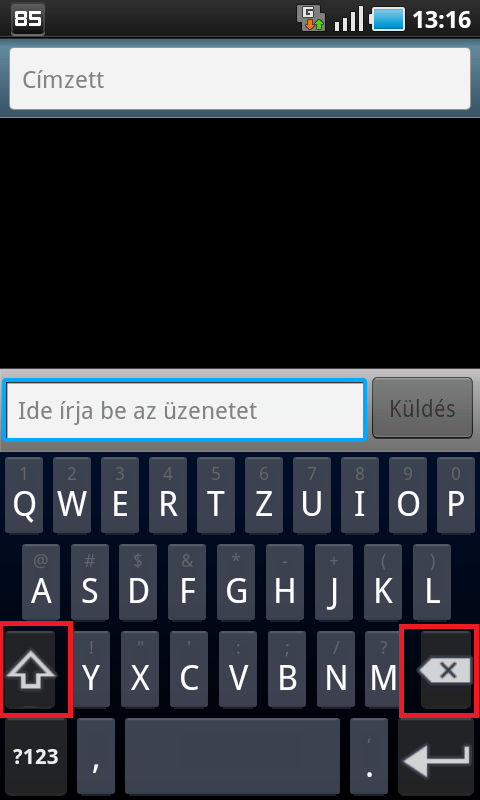
With Honeycomb (XOOM).zip my SGS is not perfect. Could you please repair it? You can see the problem on my screencapture.
Thank you!

Attachments

SC20110621-131653.png
meyergre
sure, not a big deal. i'll do it as soon as i get some time ;) probably in a few days...

Sent from my Adam using Tapatalk
PrettyGrlSwag26
I wanna kno what otha colors skins are u comin' up with?!?
meyergre
I'm not dead ! :)

I'll release the corrections for this Honeycomb skin, plus all the different versions - ldpi - mdpi - hdpi - before the end of the day.