Archived forum. This is a read-only copy of the Smart Keyboard community forum (2010–2015), kept for its history and its skins. Posts are shown as they were written, so some answers are out of date — see Help for current information. Want a post of yours removed? Email contact@smartkeyboardpro.com.
onthecouch wrote:I'm sorry, I'm unclear. To install one of these custom skins, do I have to do the steps in the OP, or was that meant for skin designers only? If someone can clarify, that'd be great.
Yes, most steps described there are for designers.
To use the custom themes: Create a folder (directory) named skins in your SD card and place the downloaded .zip files there. You can use a file manager (such as OI File Manager) to do this. No need to extract the .zip content. Afterwards, the themes will appear in the SK preferences View for you to choose from.
It doesn't seem to be showing up. Maybe I'm misunderstanding what SD Card means? I know when I plug my phone into my computer, two folder options come up: The smaler folder (with Avatar movie) and the regular phone memory folder. Which is meant by the SD card? I created a folder titled SKP Skins (does it have to be exactly Skins ?) and put in two .zip skins (Chiklet and the Glossy one). Unmounted my phone and do not see the options under SK General Settings and Select Skins.
Where did I go wrong?
EDIT: I renamed the file in my phone memory to Skins exactly, AND I created a Skins folder to the small file (with Avatar) and the skins showed up. I'm not sure which did the trick, but I can find out by taking one of 'em away.
Anyway, thanks for the advice/help, Zen. And great work on the skin. Will be difficult to choose between Chiklet and Glossy.
zen
onthecouch wrote: EDIT: I renamed the file in my phone memory to Skins exactly, AND I created a Skins folder to the small file (with Avatar) and the skins showed up. I'm not sure which did the trick, but I can find out by taking one of 'em away.
Creating the skins folder was the right one.
onthecouch wrote: Anyway, thanks for the advice/help, Zen. And great work on the skin. Will be difficult to choose between Chiklet and Glossy.
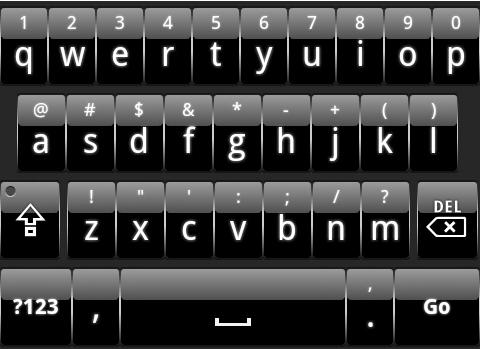
I'm sure others will soon make more skins, and much better than mine
onthecouch
Regardless, great skins to start us all off with, Zen.
Question to all and Cyril... does applying these skins do anything to the overall performance - specifically in terms of lag? Because I'm not sure if it's my imagination or not, and it'll probably require more testing, but since 3.5.1 update, the lag has been minimized I noticed (though still existent), but since applying these skins, I notice the lag coming back.
Thankfully, the damage isn't so bad, and it still registers my presses, it just comes out on screen very slowly.
Is it the skin, or just normal lag issues? Any ideas, guys?
cyrilDeveloper
onthecouch wrote:Question to all and Cyril... does applying these skins do anything to the overall performance - specifically in terms of lag?
I don't think it can have an impact on performance except when the skin is loaded for the first time, as reading from SD card and decoding the images takes more time than with the built-in skins. However it should not impact anything afterwards.
onthecouch
That's good to know, Cyril. Thanks. Then I guess it's just regular ol' lag on my phone ><
Link
cyril wrote:
onthecouch wrote:Question to all and Cyril... does applying these skins do anything to the overall performance - specifically in terms of lag?
I don't think it can have an impact on performance except when the skin is loaded for the first time, as reading from SD card and decoding the images takes more time than with the built-in skins. However it should not impact anything afterwards.
I have noticed a lag as well and not just the first time and believe it to be related to reading from the SD card. You have any suggestions for an installation process so they can be stored on the phone?
-Link
angela
I wanna like to create my own iphone skin...but i have no any idea about creating skins...please can anyone provide me complete information for creating iphone skin step by step so i have not to face any problem while creating skin.thanks
Link wrote:I have noticed a lag as well and not just the first time and believe it to be related to reading from the SD card. You have any suggestions for an installation process so they can be stored on the phone?
At the moment it's not possible to store on the internal flash. However I really doubt that lags during normal usage of the keyboard can be due to the skin stored on the SD card, as when the skin is loaded, it's then stored entirely in memory and the flash is never read until the keyboard process is restarted (which should not happen often unless you are really low on resources on your phone)
Link
cyril wrote:
Link wrote:I have noticed a lag as well and not just the first time and believe it to be related to reading from the SD card. You have any suggestions for an installation process so they can be stored on the phone?
At the moment it's not possible to store on the internal flash. However I really doubt that lags during normal usage of the keyboard can be due to the skin stored on the SD card, as when the skin is loaded, it's then stored entirely in memory and the flash is never read until the keyboard process is restarted (which should not happen often unless you are really low on resources on your phone)
I agree but the reason i think it is related is when you dock your phone to the computer over usb it unmounts the SD card and if you launch a search with the keyboard, the skin is gone. So it seems to be loading the skin every time the keyboard is launched and hence the lag. If i switch back to a built in skin, the lag is gone and no load time.
-Link
cyrilDeveloper
Good point, the keyboard is killed when the SD card is mounted/unmounted, which will cause a reload of the skin (and a failure when the SD card is mounted)
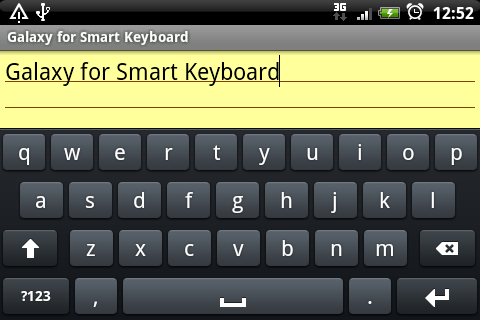
I think there might be a lot of us who would appreciate Galaxy S skin on Smart Keyboard.
zen
Cyril, I've noticed that the png asset for <shift-locked> isn't being loaded when activated. Instead, the same asset for <shift> is being loaded for both states (locked and normal)
For now, only medium resolution display is supported. Hi-res is not finished. Difficult to get the colors right, considering there are tons of display types out there; AMOLED, Super-AMOLED, LCD, Super-LCD...
I may work on it some time later, when I have finished working on my own favorite: Chiclet.
Attachments
galaxy.png
cyrilDeveloper
Cool! This is already great, even without hi-res. It just replaced the HTC skin on my own phone
zen
cyril wrote:Cool! This is already great, even without hi-res. It just replaced the HTC skin on my own phone
Yeah, I was surprised myself when seeing it on the device for the first time. Very relaxing on the eye, soft, steel-blue colors. Kudos to the forum members who suggested Galaxy S keyboard. Otherwise, I wouldn't have bothered checking out the Galaxy S myself.
Sally Mack
Wow, looks great! Good to see some more skins being produced for this awesome keyboard!
GRRemlin
I absolutely love the Galaxy skin!!!
Any chance of having the version with the green "htc" highlight?
psxgamer
Superb work zen! If the standard skin is this good, can't wait for the hi-res one!
Oveja
This is perfect Zen! You're awesome!
eolsgaard
How did you do it so fast? Man, that's awesome.
My only suggestion for the Chiclet one is to make the keys a little less rigidly square on the corners, but that's not really a big deal. It's one of my favorites!
Edit: Just tried this new Galaxy keyboard out, and this is by far the best one I've ever used. I am shocked that it could somehow get better with an HD skin. This is great.
onthecouch
Wow, Zen, I'm going to have to add my own praise for the Galaxy skin. Looks simple yet sleek. Well done.
Oveja
I believe it just needs bold fonts and drop shadows on the letters, but that hasn't been enabled on the skins yet has it?
zen
Wow, I see there's so much love for Galaxy! Thank you all.
Here it is then, an updated Galaxy for high-res displays. Download:
Oveja wrote:I believe it just needs bold fonts and drop shadows on the letters, but that hasn't been enabled on the skins yet has it?
Yes, we're waiting for Cyril on that one. As soon as the xml spec and the theme parser are updated, I'll make the changes. Drop shadow with emboss effect needs x-y offset values though, so I'm not sure if that's too much work for Cyril to implement.
zen
Galaxy in some other flavors, for the adventurers among us
That's it folks. Now going back to my trusty old Chiclet, see if I can work on it some more
zen
eolsgaard wrote: My only suggestion for the Chiclet one is to make the keys a little less rigidly square on the corners, but that's not really a big deal. It's one of my favorites!
Thanks. I was indeed going back and forth between 3 and 4 pixels chamfer, and still can't decide. Crazy how 1 pixel can be a world of difference Maybe for the hi-res I'll make it 4px chamfer and leave the medium-res at 3px as it is now. I kinda like the rigid feel.
As comparison, iPhone, Galaxy, HTC have theirs at 4px; iPhone 4 doubles it to 8px; while the Droid/MotoBlur stays sharp at 2px.
onthecouch
Just curious, what's the difference with the hi-rest and the regular version? Do I have to have a special phone/screen to see the difference, because I can't seem to tell just by looking. I'm on a Samsung Vibrant.
Love the orange highlight one. Nice job, again Zen.
cyrilDeveloper
onthecouch wrote:Just curious, what's the difference with the hi-rest and the regular version? Do I have to have a special phone/screen to see the difference, because I can't seem to tell just by looking. I'm on a Samsung Vibrant.
Hi-res skin contains images optimized for hi-resolution screens (like yours). Otherwise the mid-res images are scaled to fit the screen size, which makes them more blurry. Actually with this skin (due to the colors used) the mid-res scaled images also look fine, but the hi-res is better



 Otherwise, I wouldn't have bothered checking out the Galaxy S myself.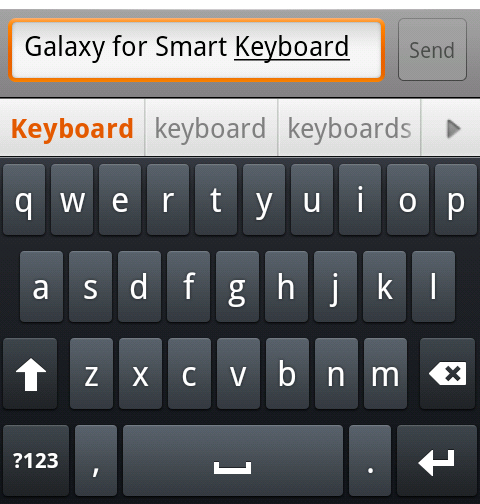
 Maybe for the hi-res I'll make it 4px chamfer and leave the medium-res at 3px as it is now. I kinda like the rigid feel.