Archived forum. This is a read-only copy of the Smart Keyboard community forum (2010–2015), kept for its history and its skins. Posts are shown as they were written, so some answers are out of date — see Help for current information. Want a post of yours removed? Email contact@smartkeyboardpro.com.
Create your own skins
eolsgaard
Oveja wrote:
eolsgaard wrote:
zen wrote: I've updated the Galaxy with the new bold fonts tag, and also tweaked the Enter/return key symbol to look more like the original Galaxy S.
For some reason the bold feature doesn't seem to be working on my Incredible... looks the same as normal.
Make sure you download the one that zen posted, because the one that's now integrated in 3.7 doesn't have bold fonts (Fix plz cyril? c: ). And make sure you are selecting the correct Galaxy skin in the keyboard settings (there will be two labelled "Galaxy", choose the second).
Hmm, I'm confused... Download which one that Zen posted? The galaxy keyboard? I deleted the old galaxy keyboard off my DInc and replaced it with the new one, but saw no change.
Oveja
The Galaxy skin he posted on page 8, with the bold fonts. Stick that in your skins folder on your sd card, make sure you are running the most recent version of SKP and choose the second "galaxy" skin listed in your keyboard settings. That should work, if not then I don't know!
eolsgaard
Oveja wrote:The Galaxy skin he posted on page 8, with the bold fonts. Stick that in your skins folder on your sd card, make sure you are running the most recent version of SKP and choose the second "galaxy" skin listed in your keyboard settings. That should work, if not then I don't know!
Yeah, did all of that, but no luck so far. I have the latest SKP (3.7.1), and I downloaded that galaxy.zip skin (bold). I have two galaxy skins listed in my settings, but regardless of which one I choose, there's no bolding. Weird. It's okay, I'm fine with the non-bold version
zen
eolsgaard wrote:
Oveja wrote:The Galaxy skin he posted on page 8, with the bold fonts. Stick that in your skins folder on your sd card, make sure you are running the most recent version of SKP and choose the second "galaxy" skin listed in your keyboard settings. That should work, if not then I don't know!
Yeah, did all of that, but no luck so far. I have the latest SKP (3.7.1), and I downloaded that galaxy.zip skin (bold). I have two galaxy skins listed in my settings, but regardless of which one I choose, there's no bolding. Weird. It's okay, I'm fine with the non-bold version
I've renamed it to Galaxy Bold and cleaned up a few declarations in the xml file. The rest is exactly the same as Galaxy previously mentioned by Oveja. If it still doesn't work, there might be a bug in Incredible that got overlooked somehow. I'm not sure.
eolsgaard
That did it, thanks zen!
zen
eolsgaard wrote:That did it, thanks zen!
My bad. The Galaxy on page 8, there was a missing file in the hdpi folder. I've fixed that one too now, thanks to you. Weird that only your phone noticed it. Others didn't.
conspirisize
Where do i put the keyboard once it is finished (on my phone to get Smart keyboard to pick it up as a skin)?
eolsgaard
I noticed that any non-native custom skins lag slightly compared to the native ones. I found this when I had two of the same galaxy skins on the phone, one native and one non-native. The non-native one would occasionally hiccup (popups/highlighs lag behind keypresses), while I couldn't replicate the problem on any of the native custom skins.
What's the difference in how the native skins are integrated vs the non-native ones? I imagine there's an extra step in between.
cyrilDeveloper
This was already discussed before, but the only difference is that decoding an external skin is more costly than loading an internal skin due to some image processing. The other difference was that an external skin had to be loaded from the SD card but this is no more the case (it's copied on the internal flash). That being that, I don't see why there would be more lags after the load of the skin, as in both cases everything is loaded in memory...
eolsgaard
Ah, I thought the SD card thing was the only difference, that was then fixed.
The lag could be unrelated to SKP, too. It's hard enough to create any kind of lag with this keyboard, so I haven't been able to consistently reproduce the same situations. Just that when I had the bold keyboard on yesterday, like 2% of the time I would hit some minor lag. Then, since I switched over to the native galaxy keyboard, I haven't hit any lag (yet). I've discovered in the past that some lag has been caused by other applications, such as handcent, and so the 2% of lag I've encountered before could just have been because I was on handcent again. I'll know if I hit some lag with the native keyboard, while using handcent, that it was handcent and not the custom skin that was causing the lag.
Link
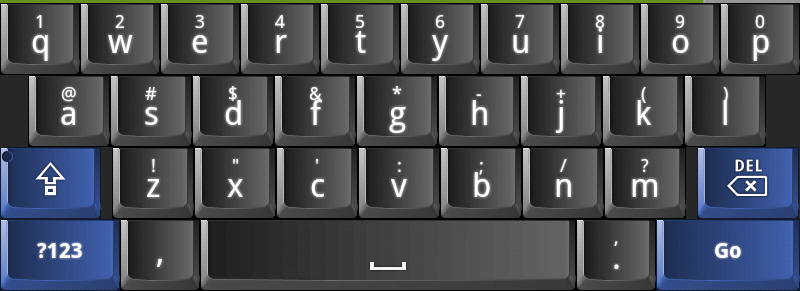
Here is another that I tried to model after a laptop. What do you guys think? I am not to happy witht he colors yet. ALSO, anyone know why the characters and the special characters are so close together? Laptop.png - Link
dsf
Link wrote:Here is another that I tried to model after a laptop. What do you guys think? I am not to happy witht he colors yet. ALSO, anyone know why the characters and the special characters are so close together? - Link
Hi, I think this looks cool, but the blue needs changing a bit I think, as I find it a bit too over powering and it doesn't look right , but other than that I think it looks really cool
also I have noticed an intermittent lag difference between the external and internal skins
Link
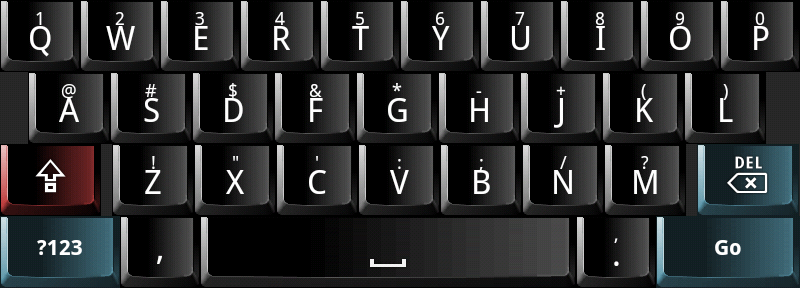
Another version a little more glossy and removed the shift light. Laptop2.png - Link
sublow
Would any of you guys be able to konck up a skin that has the same colour scheme is this?
It would look great on the x10 mini range as the rest of the phone is blue like the keyboard.
I would like the same layout of the HTC skin but a blue colour scheme.
zen, thanks for the droid keyboard, cool thing. But I'm splitting between galaxy and droid skins for now . The smartphone is moto milestone (droid for USA market).
Could someone make a keyboard themed like that? Please???
MeDo159
Hi guys, Thanks a lot for sharing the good work!
I have a strange problem, I did exactly what was mentioned,
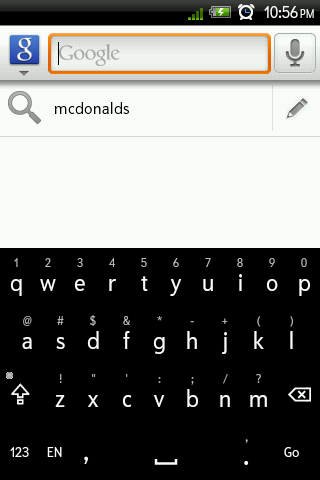
I created skins folder in SDcard and copied the skins inside it (just the zip files without extracting them), the skins appeared and I can choose any of them, but all I see then is just black background!
see the attached screenshot, this is the result for any skin I add other than built in skins
Note: I use Hero (Floyo 1.01 Rom), which is Froyo
Attachments
screenshot_1.png
Link
MeDo159 wrote:Hi guys, Thanks a lot for sharing the good work!
I have a strange problem, I did exactly what was mentioned,
I created skins folder in SDcard and copied the skins inside it (just the zip files without extracting them), the skins appeared and I can choose any of them, but all I see then is just black background!
see the attached screenshot, this is the result for any skin I add other than built in skins
Note: I use Hero (Floyo 1.01 Rom), which is Froyo
Not sure if I understand fully but all files need to be in the same structure as the other ones posted here into a single ZIP file named the same as the name in the xml file. Also make sure the png files have been created with the correct batch9 layers included. I have had issues in the past if there are any artifacts in the batch9 layer. If you want, post your skin here and we can take a look.
-Link
MeDo159
Link wrote:
MeDo159 wrote:Hi guys, Thanks a lot for sharing the good work!
I have a strange problem, I did exactly what was mentioned,
I created skins folder in SDcard and copied the skins inside it (just the zip files without extracting them), the skins appeared and I can choose any of them, but all I see then is just black background!
see the attached screenshot, this is the result for any skin I add other than built in skins
Note: I use Hero (Floyo 1.01 Rom), which is Froyo
Not sure if I understand fully but all files need to be in the same structure as the other ones posted here into a single ZIP file named the same as the name in the xml file. Also make sure the png files have been created with the correct batch9 layers included. I have had issues in the past if there are any artifacts in the batch9 layer. If you want, post your skin here and we can take a look.
-Link
Sorry I guess I didn't make my self clear
I'm not designing a skin, I'm using a ready one! I downloaded few skins from users posts here in this thread and tried to use them, where I faced the problem I mentioned above.
cyrilDeveloper
A black skin means there was an error while reading the skin. Which .zip have you installed? Is it with the latest version of SKP?
robbiep
cyril wrote:A black skin means there was an error while reading the skin. Which .zip have you installed? Is it with the latest version of SKP?
I am also getting just a black skin for both the GlossBlack and the 3DKey skins. The Droid skin works just fine however, so I'm pretty sure I'm copying everything over correctly.
EDIT: if it matters, I'm using a rooted cdma hero with cm6 nightly #99 (froyo)
windileigh
This may be answered elsewhere in the forum but I sadly don't have time to go through all the posts so here's my question: I would like to try out some of the skins that other people are making and playing with - is there a central area where I can go to and find them so I can add them to my SD card to use?
Thanks! Wendi
cyrilDeveloper
OK it's time to do things seriously, I will put links on the web site so that it's easier for everyone (and test them before so that you don't get black skins )
MeDo159
robbiep wrote:
cyril wrote:A black skin means there was an error while reading the skin. Which .zip have you installed? Is it with the latest version of SKP?
I am also getting just a black skin for both the GlossBlack and the 3DKey skins. The Droid skin works just fine however, so I'm pretty sure I'm copying everything over correctly.
EDIT: if it matters, I'm using a rooted cdma hero with cm6 nightly #99 (froyo)
YES!!!
this happens with these two skins exactly (GlossBlack and the 3DKey skins)!
Link
I created those and tested them on the EVO. Anyone else having issues? I'll take a look and post new versions later today.
-Link
cyrilDeveloper
Link: that's right, your skin doesn't work on MDPI phones, I get this error:
W/System.err(  296): com.dexilog.openskin.NinePatchUtilities$NinePatchException: invalid pixel found at x=4,y=0: D7000000
W/System.err(  296): 	at com.dexilog.openskin.NinePatchUtilities.decodeNinePatchDrawable(NinePatchUtilities.java:75)
W/System.err(  296): 	at com.dexilog.openskin.OpenSkin.loadDrawable(OpenSkin.java:319)
One of your images in drawable directory is invalid
By the way, I will create a "skins" section in the forum, it will be easier
cyrilDeveloper
OK, I understand... it seems you scaled your hdpi images to build the mdpi images, but this doesn't work you need to create the 1-pixel border properly
And I just moved this topic to the new "Open Skins" forum. From new please create one topic for each skin, as this topic starts to become a mess
Link
That's what I figured and will post new ones shortly.
Sorry for the issues and delay. I have updated the original posts with new ZIP files.
Well, the 3DKey skin now works, and looks great by the way. Unfortunately, I'm still getting a plain black skin for the GlossBlack. Using a cdma hero, so mdpi.
Thanks again, though, for revisiting these and helping make them work on more phones. I, for one, really appreciate it. I'm really liking the 3DKey right now.
Link
robbiep,
Thanks for the compliments and sorry for the trouble. I have modified them again. Try again and thanks for testing.


 The Galaxy on page 8, there was a missing file in the hdpi folder. I've fixed that one too now, thanks to you. Weird that only your phone noticed it.
  Others didn't.