Archived forum. This is a read-only copy of the Smart Keyboard community forum (2010–2015), kept for its history and its skins. Posts are shown as they were written, so some answers are out of date — see Help for current information. Want a post of yours removed? Email contact@smartkeyboardpro.com.
3DKey skin
Link
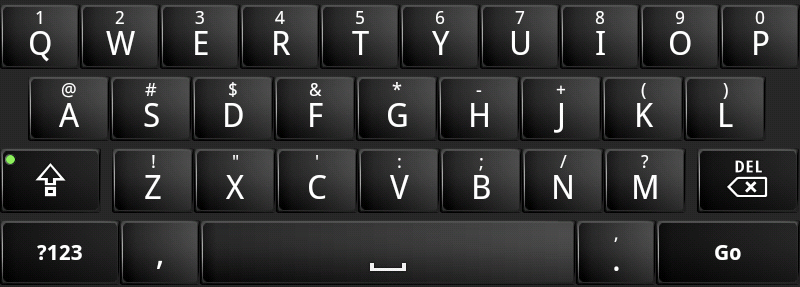
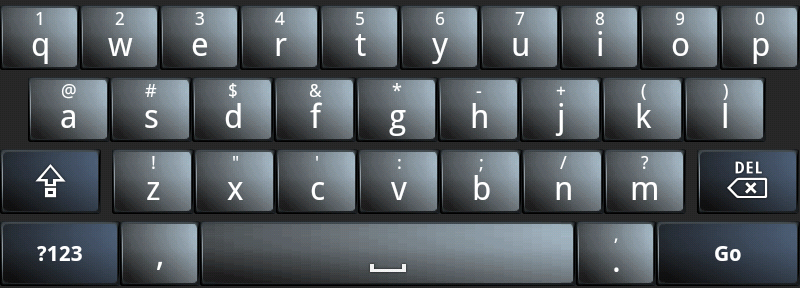
Keyboard with a bit of dimension. 20101015141936.png
It seems superb on landscape but so so on potrait mode on Milestone!
But thanks for the skin!
wire-to-wire
Thanks, this is exactly what I've been looking for. Any chance you'll do more colors?
Link
wire-to-wire wrote:Thanks, this is exactly what I've been looking for. Any chance you'll do more colors?
Yep, working on that now. Preference?
melmel
Link wrote:Yep, working on that now. Preference?
Thanks for a beautiful keyboard! Would you consider making one in steel gray, brushed aluminum, or with a transparent background? How about a blue caps lock indicator to match your key pressed color?
Link
melmel wrote:
Link wrote:Yep, working on that now. Preference?
Thanks for a beautiful keyboard! Would you consider making one in steel gray, brushed aluminum, or with a transparent background? How about a blue caps lock indicator to match your key pressed color?
When you say transparent background, do you mean the keys or the gray background behind the keys?
Link
Not sure I am happy with this color, what do you think? blue.png
Can someone please give me step by step directions on how to install this skin using astro file manager? The directions in the post on installing skins is confusing to me. Any help would be appreciated. Thanx
tryll1980
chris6278 wrote:Can someone please give me step by step directions on how to install this skin using astro file manager? The directions in the post on installing skins is confusing to me. Any help would be appreciated. Thanx
I would like to know too. Please.
Sent from my Legend using Tapatalk
Link
Just put the zip file in a "skins" folder at the root of your SDCARD. Then it will show in the list.
chris6278
How do i move it into that folder?
Link
chris6278 wrote:How do i move it into that folder?
Either plug it into your computer or use an app like Astro File Manager.
chris6278
Im using astro an when i download it it goes into the download folder my ? is how do i move it to the skins folder?
Link
Just like windows, copy paste.
Tap-hold on file Select move or cut Change to skins folder Paste
chris6278
Thanx i got it to work. Can u please post a link to that blue one on the front page? That one looks pretty cool
studlyadam
chris6278 wrote:Thanx i got it to work. Can u please post a link to that blue one on the front page? That one looks pretty cool
I agree with this person can you please post a link to the alternative version and could you do a version like that other guy said with a transparent background not the keys just the background that would own. Thank you!!
stefanl
I would also love a link to the alternative color
Link
Ok, I posted the ZIP on the 3DKeyBlue and here is the 3DKeyClear. Not sure this is what you want but take a look.
Link wrote:Ok, I posted the ZIP on the 3DKeyBlue and here is the 3DKeyClear.
it looks like you only changed the hdpi images in 3DKeyBlue... any chance you could change the mdpi ones, too?
edit: file removed.
Link
hotaru wrote:
Link wrote:Ok, I posted the ZIP on the 3DKeyBlue and here is the 3DKeyClear.
it looks like you only changed the hdpi images in 3DKeyBlue... any chance you could change the mdpi ones, too?
edit: i decided to try doing it myself... just resized the hdpi images and fixed up the border, then put them in the folder for the mdpi images.
I have updated the original post attachment. Please remove this version so we don't get confused.
I have also updated the CLEAR version to include mdpi as well.
hotaru
Link wrote:I have updated the original post attachment. Please remove this version so we don't get confused.
thanks! i've removed the file.
1st2run
I'm loving the 3DKey skin, its just what I've been looking for but any chance of getting it with Green key press highlight color instead of blue?
PROXIMO
I think 3DKey is the best skin and not only should be imported in the app, but should be default skin. I think we have to vote for a default skin for SKP.
Link
PROXIMO wrote:I think 3DKey is the best skin and not only should be imported in the app, but should be default skin. I think we have to vote for a default skin for SKP.
Thanks! I appreciate the support and feedback.
PROXIMO
I like it so much, just can u make that more suits QVGA display with 65K color. Gradients don't look so good on that display, although i have seen it on bigger ones with more colors, and it is my fav.
Link
PROXIMO wrote:I like it so much, just can u make that more suits QVGA display with 65K color. Gradients don't look so good on that display, although i have seen it on bigger ones with more colors, and it is my fav.
Sure, here is a 64K dithered version for mdpi. Try it out and let me know as I don't have a mdpi device to test with.
Edit: removed attachment
PROXIMO
It looks completely black. I cant see the buttons. edit: Forget about it this, it is not so bad (old 3dkey).. but buttons are too close together, can u make the same colour kbd but with this layout http://img51.imageshack.us/img51/2515/androidblue.png Difference between yours and that 1 are that your key height is a little smaller and alt symbols are on the border of the button, and there is almost no space between buttons in a roll. 10x
edit2: they are same height, i can see that now, it was just an illusion.
rdoane
Is there anyway you could make a white (or Droid X) themed verison of this skin? Thanks!
raylow
Beautifull skin!
But in portrait-mode the buttons "delete" and "shift" are empty. The same for the button for the microfone and the "return" key.
Same problem in landscape mode. Maybe the device is the reason for that.. it's the HTC Desire HD.
Link
raylow wrote:Beautifull skin!
But in portrait-mode the buttons "delete" and "shift" are empty. The same for the button for the microfone and the "return" key.
Same problem in landscape mode. Maybe the device is the reason for that.. it's the HTC Desire HD.
Haven't seen any issues so far. Must be something with your phone or the version of the keyboard. You should email support.